Store-wide settings for Partial Payment: tax handling, the shipping rate keyword, Same Order vs New Order, plus Meta Pixel and Google Ads tracking.
Rules decide what each option does. Advanced Settings decide how Partial Payment behaves across the whole store. Open Settings → Partial payments & COD and click the Advanced Settings tab next to Payment Rules.
If you change something, the Save bar appears at the top. Click Save to keep it.
Shipping Rate Keyword is a word that identifies partial-payment shipping rates, for example partial or installment. When a customer picks a shipping rate that contains this word at checkout, COD King triggers the deposit flow.
This decides what happens to the order when only part of it is paid online.
Option
What happens
Best for
Same Order (Recommended)
The remaining COD amount is added to the same order shortly after it is placed (usually within 1–2 minutes). Example: a ₹1000 order with ₹100 paid upfront is updated to ₹900 as the COD amount.
Stores that fulfil orders manually.
New Order
The original order is cancelled and a new order is created for the COD remainder. Example: a ₹1000 order with ₹100 upfront is cancelled and replaced by a ₹900 COD order.
Stores with automatic fulfilment or a 3PL, where the order is picked up the instant it is created.
Choose carefully if you use automatic fulfilment. With Same Order there is a short moment before the balance is added. If your 3PL picks orders up immediately, use New Order.
Both are configured outside this page, under Settings → Integrations, so that deposits and purchases feed your ad reporting.
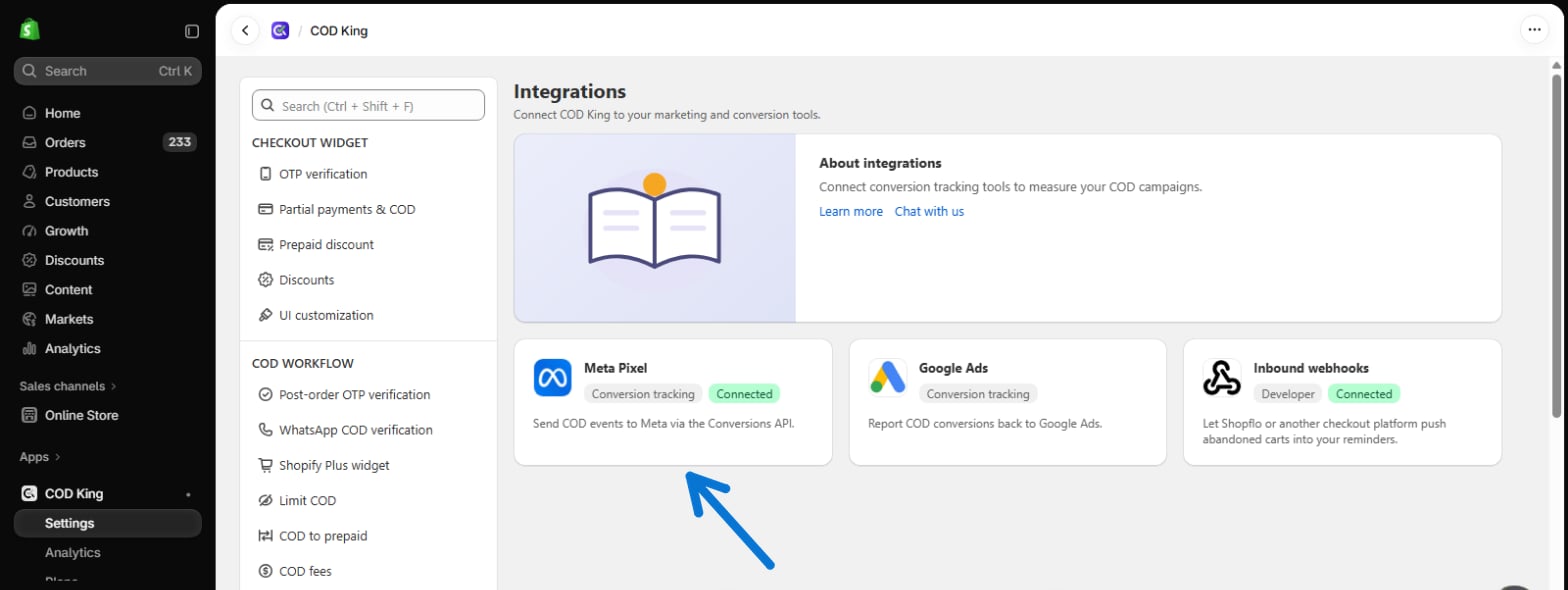
Meta (Facebook) Pixel: open Meta Pixel and enter your Pixel ID and Conversions API access token.
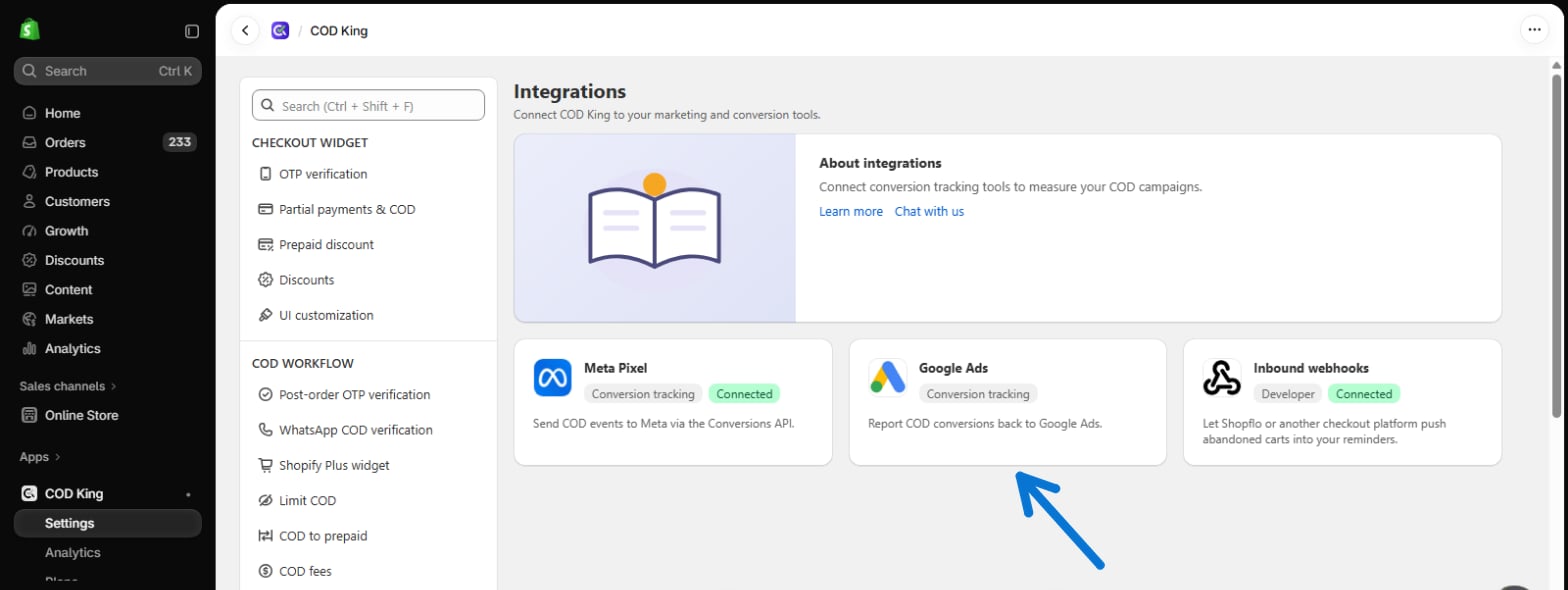
Google Ads: open Google Ads and enter your Conversion ID and Conversion Label.
{"docsConfig":{"theme":"mint","$schema":"https://mintlify.com/docs.json","name":"COD King Documentation","description":"Official documentation for COD King — configure and manage Cash on Delivery workflows for your Shopify store.","colors":{"primary":"#196bf5","light":"#4C8DF7","dark":"#0B4FC2"},"logo":{"light":"https://mintcdn.com/codking/bTZqp1QmGOkbuICj/images/withbglogo2.png?fit=max\u0026auto=format\u0026n=bTZqp1QmGOkbuICj\u0026q=85\u0026s=2342e0e9511f98c0a18f23ce47244c2f","dark":"https://mintcdn.com/codking/bTZqp1QmGOkbuICj/images/withbglogo2.png?fit=max\u0026auto=format\u0026n=bTZqp1QmGOkbuICj\u0026q=85\u0026s=2342e0e9511f98c0a18f23ce47244c2f","href":"https://codking.tech/"},"favicon":"https://mintcdn.com/codking/o9R0nutNDYrv62Dh/logo/CK%20logo%20icon-1200px.png?fit=max\u0026auto=format\u0026n=o9R0nutNDYrv62Dh\u0026q=85\u0026s=3aa5b1ed579fc29e186304324b2e9b50","appearance":{"default":"light","strict":true},"background":{"decoration":"gradient"},"navbar":{"links":[{"href":"mailto:support@notifiktech.com","label":"Support"}]},"search":{"prompt":"Search Codking docs..."},"seo":{"metatags":{"og:title":"COD King Documentation","og:description":"Official guides and documentation for COD King on Shopify.","og:site_name":"Codking Docs"}},"contextual":{"options":["copy","view","chatgpt","claude","assistant"],"display":"header"},"styling":{"latex":false},"navigation":{"pages":[]}},"deployment":{"deploymentMetadataValue":{"subdomain":"codking","hasAudioNarration":false,"actualSubdomain":"codking","customDomains":["docs.codking.tech"],"gitSource":{"type":"github","owner":"rabbitpay2026","repo":"codking-docs","deployBranch":"main","contentDirectory":"","isPrivate":false,"mountPath":"","label":""},"feedback":{"agentFeedback":false,"edits":false,"issues":false,"thumbs":false},"entitlements":{},"buildId":"6ae1fe29f9cefd8f8d7a399d","clientVersion":"0.0.4087","searchFilterCounts":[{"language":"default","tag":"Documentation","count":58},{"language":"default","tag":"Core Features","count":55},{"language":"default","tag":"Local SMS Gateway","count":13},{"language":"default","tag":"COD Form","count":8},{"language":"default","tag":"Partial Payment","count":8},{"language":"default","tag":"OTP Verification","count":7},{"language":"default","tag":"Branded WhatsApp","count":6},{"language":"default","tag":"Business WhatsApp","count":5},{"language":"default","tag":"WhatsApp Inbox \u0026 AI Agent","count":4},{"language":"default","tag":"Help \u0026 Support","count":2}]},"assistantConfig":{"enableAskAiButton":false,"enableStarterQuestions":false,"enableContextualStarterQuestions":false,"enableAskAiSearchBar":true},"basePath":"","hasChatPermissions":false,"hasWebMcpPermissions":false,"toggles":[{"name":"kill-isr","enabled":true,"variant":{"name":"disabled","enabled":false,"feature_enabled":true},"impressionData":false},{"name":"agent-mintlify-slack","enabled":true,"variant":{"name":"disabled","enabled":false,"feature_enabled":true},"impressionData":false},{"name":"agent-integrations-settings","enabled":true,"variant":{"name":"disabled","enabled":false,"feature_enabled":true},"impressionData":false},{"name":"rbac-expansion","enabled":true,"variant":{"name":"disabled","enabled":false,"feature_enabled":true},"impressionData":false},{"name":"automations-pr-grouping","enabled":true,"variant":{"name":"disabled","enabled":false,"feature_enabled":true},"impressionData":false},{"name":"custom-prefix","enabled":true,"variant":{"name":"disabled","enabled":false,"feature_enabled":true},"impressionData":false},{"name":"analytics-v7","enabled":true,"variant":{"name":"disabled","enabled":false,"feature_enabled":true},"impressionData":false},{"name":"user-flows-analytics","enabled":true,"variant":{"name":"disabled","enabled":false,"feature_enabled":true},"impressionData":false},{"name":"no-publish-flow","enabled":true,"variant":{"name":"disabled","enabled":false,"feature_enabled":true},"impressionData":false},{"name":"workos-onboarding","enabled":true,"variant":{"name":"disabled","enabled":false,"feature_enabled":true},"impressionData":false},{"name":"llms-txt-v2","enabled":true,"variant":{"name":"disabled","enabled":false,"feature_enabled":true},"impressionData":false},{"name":"snapshot-serving-live","enabled":true,"variant":{"name":"disabled","enabled":false,"feature_enabled":true},"impressionData":false},{"name":"stripTemperatureMiddleware","enabled":true,"variant":{"name":"disabled","enabled":false,"feature_enabled":true},"impressionData":false},{"name":"support-platform-pylon-zendesk","enabled":true,"variant":{"name":"disabled","enabled":false,"feature_enabled":true},"impressionData":false},{"name":"snapshot-serving","enabled":true,"variant":{"name":"disabled","enabled":false,"feature_enabled":true},"impressionData":false},{"name":"instant-rollback","enabled":true,"variant":{"name":"disabled","enabled":false,"feature_enabled":true},"impressionData":false},{"name":"granular-notifications-server","enabled":true,"variant":{"name":"disabled","enabled":false,"feature_enabled":true},"impressionData":false},{"name":"granular-notifications","enabled":true,"variant":{"name":"disabled","enabled":false,"feature_enabled":true},"impressionData":false},{"name":"automations-fable","enabled":true,"variant":{"name":"disabled","enabled":false,"feature_enabled":true},"impressionData":false},{"name":"fixed-ai-action-pricing","enabled":true,"variant":{"name":"disabled","enabled":false,"feature_enabled":true},"impressionData":false},{"name":"automation-resolve-merge-conflict","enabled":true,"variant":{"name":"disabled","enabled":false,"feature_enabled":true},"impressionData":false},{"name":"scoped-publishing","enabled":true,"variant":{"name":"disabled","enabled":false,"feature_enabled":true},"impressionData":false},{"name":"mintql","enabled":true,"variant":{"name":"disabled","enabled":false,"feature_enabled":true},"impressionData":false},{"name":"page-level-analytics","enabled":true,"variant":{"name":"disabled","enabled":false,"feature_enabled":true},"impressionData":false},{"name":"editor-version-history-v2","enabled":true,"variant":{"name":"disabled","enabled":false,"feature_enabled":true},"impressionData":false},{"name":"billing-page-v2","enabled":true,"variant":{"name":"disabled","enabled":false,"feature_enabled":true},"impressionData":false},{"name":"full-page-search","enabled":true,"variant":{"name":"disabled","enabled":false,"feature_enabled":true},"impressionData":false},{"name":"workspace-projects","enabled":true,"variant":{"name":"disabled","enabled":false,"feature_enabled":true},"impressionData":false},{"name":"assistant-v5","enabled":true,"variant":{"name":"disabled","enabled":false,"feature_enabled":true},"impressionData":false},{"name":"fork-pr-previews","enabled":true,"variant":{"name":"disabled","enabled":false,"feature_enabled":true},"impressionData":false},{"name":"revalidation-jwt","enabled":true,"variant":{"name":"disabled","enabled":false,"feature_enabled":true},"impressionData":false},{"name":"workos-sso-scim","enabled":true,"variant":{"name":"disabled","enabled":false,"feature_enabled":true},"impressionData":false},{"name":"hobby-abuse-scan","enabled":true,"variant":{"name":"disabled","enabled":false,"feature_enabled":true},"impressionData":false},{"name":"dashboard-inbox","enabled":true,"variant":{"name":"disabled","enabled":false,"feature_enabled":true},"impressionData":false},{"name":"workos-signup","enabled":true,"variant":{"name":"disabled","enabled":false,"feature_enabled":true},"impressionData":false},{"name":"turbopuffer-dual-write","enabled":true,"variant":{"name":"disabled","enabled":false,"feature_enabled":true},"impressionData":false},{"name":"workos-enabled","enabled":true,"variant":{"name":"disabled","enabled":false,"feature_enabled":true},"impressionData":false},{"name":"approve-review-flow","enabled":true,"variant":{"name":"disabled","enabled":false,"feature_enabled":true},"impressionData":false},{"name":"editor-metadata","enabled":true,"variant":{"name":"disabled","enabled":false,"feature_enabled":true},"impressionData":false},{"name":"sso-setup-deadline-banner","enabled":true,"variant":{"name":"disabled","enabled":false,"feature_enabled":true},"impressionData":false},{"name":"turbopuffer-serve","enabled":true,"variant":{"name":"disabled","enabled":false,"feature_enabled":true},"impressionData":false},{"name":"live-agents","enabled":true,"variant":{"name":"disabled","enabled":false,"feature_enabled":true},"impressionData":false},{"name":"comment-mode","enabled":true,"variant":{"name":"disabled","enabled":false,"feature_enabled":true},"impressionData":false}],"googleFontsInlined":false},"customCss":[],"page":{"pagePath":"partial-payment/advanced-settings","slug":"/partial-payment/advanced-settings","pageMetadata":{"title":"Partial Payment Advanced Settings","sidebarTitle":"Advanced settings","icon":"sliders","description":"Store-wide settings for Partial Payment: tax handling, the shipping rate keyword, Same Order vs New Order, plus Meta Pixel and Google Ads tracking.","href":"/documentation/partial-payment/advanced-settings"},"description":{"compiledSource":"\"use strict\";\nconst {jsx: _jsx} = arguments[0];\nconst {useMDXComponents: _provideComponents} = arguments[0];\nfunction _createMdxContent(props) {\n const _components = {\n p: \"p\",\n ..._provideComponents(),\n ...props.components\n };\n return _jsx(_components.p, {\n children: \"Store-wide settings for Partial Payment: tax handling, the shipping rate keyword, Same Order vs New Order, plus Meta Pixel and Google Ads tracking.\"\n });\n}\nfunction MDXContent(props = {}) {\n const {wrapper: MDXLayout} = {\n ..._provideComponents(),\n ...props.components\n };\n return MDXLayout ? _jsx(MDXLayout, {\n ...props,\n children: _jsx(_createMdxContent, {\n ...props\n })\n }) : _createMdxContent(props);\n}\nreturn {\n default: MDXContent\n};\n","frontmatter":{},"scope":{}},"pageType":"default","mdx":{"mdxSource":{"compiledSource":"\"use strict\";const{Fragment:_Fragment,jsx:_jsx,jsxs:_jsxs}=arguments[0];const{useMDXComponents:_provideComponents}=arguments[0];function _createMdxContent(props){const _components={code:`code`,em:`em`,li:`li`,p:`p`,strong:`strong`,tbody:`tbody`,td:`td`,th:`th`,thead:`thead`,tr:`tr`,ul:`ul`,..._provideComponents(),...props.components},{Frame,Heading,OptimizedImage,Table,Tip,Warning}=_components;if(!Frame)_missingMdxReference(`Frame`,true);if(!Heading)_missingMdxReference(`Heading`,true);if(!OptimizedImage)_missingMdxReference(`OptimizedImage`,true);if(!Table)_missingMdxReference(`Table`,true);if(!Tip)_missingMdxReference(`Tip`,true);if(!Warning)_missingMdxReference(`Warning`,true);return _jsxs(_Fragment,{children:[_jsxs(_components.p,{children:[`Rules decide what each option does. `,_jsx(_components.strong,{children:`Advanced Settings`}),` decide how Partial Payment behaves across the whole store. Open `,_jsx(_components.strong,{children:`Settings → Partial payments \u0026 COD`}),` and click the `,_jsx(_components.strong,{children:`Advanced Settings`}),` tab next to `,_jsx(_components.strong,{children:`Payment Rules`}),`.`]}),`\n`,_jsx(Frame,{children:_jsx(OptimizedImage,{src:`https://mintcdn.com/codking/V_6A1jKaaiecFXhG/images/pp-03-adv-tax.png?fit=max\u0026auto=format\u0026n=V_6A1jKaaiecFXhG\u0026q=85\u0026s=0ad2e44517fbd83cc622647bfceb1c32`,alt:`Advanced Settings tab`,\"data-og-width\":`1230`,width:`1230`,\"data-og-height\":`1000`,height:`1000`,\"data-path\":`images/pp-03-adv-tax.png`,\"data-optimize\":`true`,\"data-opv\":`3`,srcset:`https://mintcdn.com/codking/V_6A1jKaaiecFXhG/images/pp-03-adv-tax.png?w=280\u0026fit=max\u0026auto=format\u0026n=V_6A1jKaaiecFXhG\u0026q=85\u0026s=bfab73e35e56af76d6cc546eb2cf28c1 280w, https://mintcdn.com/codking/V_6A1jKaaiecFXhG/images/pp-03-adv-tax.png?w=560\u0026fit=max\u0026auto=format\u0026n=V_6A1jKaaiecFXhG\u0026q=85\u0026s=3cf9b15625ebba85923600c2aad8f618 560w, https://mintcdn.com/codking/V_6A1jKaaiecFXhG/images/pp-03-adv-tax.png?w=840\u0026fit=max\u0026auto=format\u0026n=V_6A1jKaaiecFXhG\u0026q=85\u0026s=27d53f6e4cc4e8086a8eda0944a385e3 840w, https://mintcdn.com/codking/V_6A1jKaaiecFXhG/images/pp-03-adv-tax.png?w=1100\u0026fit=max\u0026auto=format\u0026n=V_6A1jKaaiecFXhG\u0026q=85\u0026s=dd828eef0c164e40d8ec194a20405825 1100w, https://mintcdn.com/codking/V_6A1jKaaiecFXhG/images/pp-03-adv-tax.png?w=1650\u0026fit=max\u0026auto=format\u0026n=V_6A1jKaaiecFXhG\u0026q=85\u0026s=dd3454363e01a19bf69438415e392b98 1650w, https://mintcdn.com/codking/V_6A1jKaaiecFXhG/images/pp-03-adv-tax.png?w=2500\u0026fit=max\u0026auto=format\u0026n=V_6A1jKaaiecFXhG\u0026q=85\u0026s=8e439a994c38e4f255c41342e2c44b2f 2500w`})}),`\n`,_jsxs(_components.p,{children:[`If you change something, the `,_jsx(_components.strong,{children:`Save`}),` bar appears at the top. Click `,_jsx(_components.strong,{children:`Save`}),` to keep it.`]}),`\n`,_jsx(Heading,{level:`2`,id:`tax-and-calculations`,children:`Tax and calculations`}),`\n`,_jsxs(Table,{children:[_jsx(_components.thead,{children:_jsxs(_components.tr,{children:[_jsx(_components.th,{style:{textAlign:`left`},children:`Setting`}),_jsx(_components.th,{style:{textAlign:`left`},children:`What it does`})]})}),_jsxs(_components.tbody,{children:[_jsxs(_components.tr,{children:[_jsx(_components.td,{style:{textAlign:`left`},children:_jsx(_components.strong,{children:`Include tax in product calculations`})}),_jsx(_components.td,{style:{textAlign:`left`},children:`Ticked by default. Taxes are included when the upfront and later amounts are worked out.`})]}),_jsxs(_components.tr,{children:[_jsx(_components.td,{style:{textAlign:`left`},children:_jsx(_components.strong,{children:`Partial Tax Text`})}),_jsxs(_components.td,{style:{textAlign:`left`},children:[`Text shown to explain tax when it is left for later. Default: `,_jsx(_components.em,{children:`Taxes computed later`}),`.`]})]})]})]}),`\n`,_jsx(Tip,{children:_jsx(_components.p,{children:`If your deposit does not include tax, change the Partial Tax Text to something clear for your customers, such as “Taxes due on delivery”.`})}),`\n`,_jsx(Heading,{level:`2`,id:`shipping-configuration`,children:`Shipping configuration`}),`\n`,_jsx(Frame,{children:_jsx(OptimizedImage,{src:`https://mintcdn.com/codking/V_6A1jKaaiecFXhG/images/pp-04-adv-shipping.png?fit=max\u0026auto=format\u0026n=V_6A1jKaaiecFXhG\u0026q=85\u0026s=fef2a114cdd28aa9d2c7bd42b80f8a6a`,alt:`Shipping Rate Keyword field`,\"data-og-width\":`1230`,width:`1230`,\"data-og-height\":`1000`,height:`1000`,\"data-path\":`images/pp-04-adv-shipping.png`,\"data-optimize\":`true`,\"data-opv\":`3`,srcset:`https://mintcdn.com/codking/V_6A1jKaaiecFXhG/images/pp-04-adv-shipping.png?w=280\u0026fit=max\u0026auto=format\u0026n=V_6A1jKaaiecFXhG\u0026q=85\u0026s=ee939cf1e431556c3ee2b669e0c03063 280w, https://mintcdn.com/codking/V_6A1jKaaiecFXhG/images/pp-04-adv-shipping.png?w=560\u0026fit=max\u0026auto=format\u0026n=V_6A1jKaaiecFXhG\u0026q=85\u0026s=18e1a1ebda67a39887e004d9a5689c5a 560w, https://mintcdn.com/codking/V_6A1jKaaiecFXhG/images/pp-04-adv-shipping.png?w=840\u0026fit=max\u0026auto=format\u0026n=V_6A1jKaaiecFXhG\u0026q=85\u0026s=781c226528b7a9bbc10ac5d27ac9b380 840w, https://mintcdn.com/codking/V_6A1jKaaiecFXhG/images/pp-04-adv-shipping.png?w=1100\u0026fit=max\u0026auto=format\u0026n=V_6A1jKaaiecFXhG\u0026q=85\u0026s=2a97eb58b54c01bdd97a7e2f0872abd6 1100w, https://mintcdn.com/codking/V_6A1jKaaiecFXhG/images/pp-04-adv-shipping.png?w=1650\u0026fit=max\u0026auto=format\u0026n=V_6A1jKaaiecFXhG\u0026q=85\u0026s=f35a008e01ecda5eb29926c9a14d7c17 1650w, https://mintcdn.com/codking/V_6A1jKaaiecFXhG/images/pp-04-adv-shipping.png?w=2500\u0026fit=max\u0026auto=format\u0026n=V_6A1jKaaiecFXhG\u0026q=85\u0026s=dc93746dd76982e4aa84268834a7b5fd 2500w`})}),`\n`,_jsxs(_components.p,{children:[_jsx(_components.strong,{children:`Shipping Rate Keyword`}),` is a word that identifies partial-payment shipping rates, for example `,_jsx(_components.code,{children:`partial`}),` or `,_jsx(_components.code,{children:`installment`}),`. When a customer picks a shipping rate that contains this word at checkout, COD King triggers the deposit flow.`]}),`\n`,_jsx(Heading,{level:`2`,id:`payment-flow`,children:`Payment flow`}),`\n`,_jsx(_components.p,{children:`This decides what happens to the order when only part of it is paid online.`}),`\n`,_jsx(Frame,{children:_jsx(OptimizedImage,{src:`https://mintcdn.com/codking/V_6A1jKaaiecFXhG/images/pp-05-adv-flow.png?fit=max\u0026auto=format\u0026n=V_6A1jKaaiecFXhG\u0026q=85\u0026s=b89aa28c00252aa5d94c18123b90c7ab`,alt:`Payment Flow with Same Order selected`,\"data-og-width\":`1230`,width:`1230`,\"data-og-height\":`1000`,height:`1000`,\"data-path\":`images/pp-05-adv-flow.png`,\"data-optimize\":`true`,\"data-opv\":`3`,srcset:`https://mintcdn.com/codking/V_6A1jKaaiecFXhG/images/pp-05-adv-flow.png?w=280\u0026fit=max\u0026auto=format\u0026n=V_6A1jKaaiecFXhG\u0026q=85\u0026s=8326415358e6e6238b516a53e2aef140 280w, https://mintcdn.com/codking/V_6A1jKaaiecFXhG/images/pp-05-adv-flow.png?w=560\u0026fit=max\u0026auto=format\u0026n=V_6A1jKaaiecFXhG\u0026q=85\u0026s=d094a0def8b3107ba651f603e498b196 560w, https://mintcdn.com/codking/V_6A1jKaaiecFXhG/images/pp-05-adv-flow.png?w=840\u0026fit=max\u0026auto=format\u0026n=V_6A1jKaaiecFXhG\u0026q=85\u0026s=0cad0b5988b94a0e8f52d6b019fcba2b 840w, https://mintcdn.com/codking/V_6A1jKaaiecFXhG/images/pp-05-adv-flow.png?w=1100\u0026fit=max\u0026auto=format\u0026n=V_6A1jKaaiecFXhG\u0026q=85\u0026s=d7c935e5724302e17ce174b9e575bd5a 1100w, https://mintcdn.com/codking/V_6A1jKaaiecFXhG/images/pp-05-adv-flow.png?w=1650\u0026fit=max\u0026auto=format\u0026n=V_6A1jKaaiecFXhG\u0026q=85\u0026s=2bea4afdac43aa82cca6297b9069013e 1650w, https://mintcdn.com/codking/V_6A1jKaaiecFXhG/images/pp-05-adv-flow.png?w=2500\u0026fit=max\u0026auto=format\u0026n=V_6A1jKaaiecFXhG\u0026q=85\u0026s=5c39f2f6e878754c350183b9062595e4 2500w`})}),`\n`,_jsxs(Table,{children:[_jsx(_components.thead,{children:_jsxs(_components.tr,{children:[_jsx(_components.th,{style:{textAlign:`left`},children:`Option`}),_jsx(_components.th,{style:{textAlign:`left`},children:`What happens`}),_jsx(_components.th,{style:{textAlign:`left`},children:`Best for`})]})}),_jsxs(_components.tbody,{children:[_jsxs(_components.tr,{children:[_jsx(_components.td,{style:{textAlign:`left`},children:_jsx(_components.strong,{children:`Same Order (Recommended)`})}),_jsxs(_components.td,{style:{textAlign:`left`},children:[`The remaining COD amount is added to the `,_jsx(_components.strong,{children:`same order`}),` shortly after it is placed (usually within 1–2 minutes). Example: a ₹1000 order with ₹100 paid upfront is updated to ₹900 as the COD amount.`]}),_jsx(_components.td,{style:{textAlign:`left`},children:`Stores that fulfil orders manually.`})]}),_jsxs(_components.tr,{children:[_jsx(_components.td,{style:{textAlign:`left`},children:_jsx(_components.strong,{children:`New Order`})}),_jsxs(_components.td,{style:{textAlign:`left`},children:[`The original order is `,_jsx(_components.strong,{children:`cancelled`}),` and a `,_jsx(_components.strong,{children:`new order`}),` is created for the COD remainder. Example: a ₹1000 order with ₹100 upfront is cancelled and replaced by a ₹900 COD order.`]}),_jsx(_components.td,{style:{textAlign:`left`},children:`Stores with automatic fulfilment or a 3PL, where the order is picked up the instant it is created.`})]})]})]}),`\n`,_jsx(Warning,{children:_jsxs(_components.p,{children:[`Choose carefully if you use automatic fulfilment. With `,_jsx(_components.strong,{children:`Same Order`}),` there is a short moment before the balance is added. If your 3PL picks orders up immediately, use `,_jsx(_components.strong,{children:`New Order`}),`.`]})}),`\n`,_jsx(Heading,{level:`2`,id:`meta-pixel-and-google-ads`,children:`Meta Pixel and Google Ads`}),`\n`,_jsxs(_components.p,{children:[`Both are configured outside this page, under `,_jsx(_components.strong,{children:`Settings → Integrations`}),`, so that deposits and purchases feed your ad reporting.`]}),`\n`,_jsxs(_components.ul,{children:[`\n`,_jsxs(_components.li,{children:[_jsx(_components.strong,{children:`Meta (Facebook) Pixel`}),`: open `,_jsx(_components.strong,{children:`Meta Pixel`}),` and enter your Pixel ID and Conversions API access token.`,`\n`,_jsx(Frame,{children:_jsx(OptimizedImage,{src:`https://mintcdn.com/codking/eB0wOGR77E4GSgQJ/images/pp-16-meta-pixel.png?fit=max\u0026auto=format\u0026n=eB0wOGR77E4GSgQJ\u0026q=85\u0026s=74e5bd43d9788275eb7dd88eb044088a`,alt:`Meta Pixel card under Integrations`,\"data-og-width\":`1568`,width:`1568`,\"data-og-height\":`590`,height:`590`,\"data-path\":`images/pp-16-meta-pixel.png`,\"data-optimize\":`true`,\"data-opv\":`3`,srcset:`https://mintcdn.com/codking/eB0wOGR77E4GSgQJ/images/pp-16-meta-pixel.png?w=280\u0026fit=max\u0026auto=format\u0026n=eB0wOGR77E4GSgQJ\u0026q=85\u0026s=aa3030729b787bc610e7b9168fe4cf28 280w, https://mintcdn.com/codking/eB0wOGR77E4GSgQJ/images/pp-16-meta-pixel.png?w=560\u0026fit=max\u0026auto=format\u0026n=eB0wOGR77E4GSgQJ\u0026q=85\u0026s=68bf937e4edc739c6f20b12ce3988d87 560w, https://mintcdn.com/codking/eB0wOGR77E4GSgQJ/images/pp-16-meta-pixel.png?w=840\u0026fit=max\u0026auto=format\u0026n=eB0wOGR77E4GSgQJ\u0026q=85\u0026s=b5f12dc67df11e5f89f06a5c0b6f3eda 840w, https://mintcdn.com/codking/eB0wOGR77E4GSgQJ/images/pp-16-meta-pixel.png?w=1100\u0026fit=max\u0026auto=format\u0026n=eB0wOGR77E4GSgQJ\u0026q=85\u0026s=2fb5108355cc71ae3c3c33a5311f9936 1100w, https://mintcdn.com/codking/eB0wOGR77E4GSgQJ/images/pp-16-meta-pixel.png?w=1650\u0026fit=max\u0026auto=format\u0026n=eB0wOGR77E4GSgQJ\u0026q=85\u0026s=22059f166fd0d6859376beb0e6094480 1650w, https://mintcdn.com/codking/eB0wOGR77E4GSgQJ/images/pp-16-meta-pixel.png?w=2500\u0026fit=max\u0026auto=format\u0026n=eB0wOGR77E4GSgQJ\u0026q=85\u0026s=f06af2b1cdda38d7764dad1c2cc8fd29 2500w`})}),`\n`]}),`\n`,_jsxs(_components.li,{children:[_jsx(_components.strong,{children:`Google Ads`}),`: open `,_jsx(_components.strong,{children:`Google Ads`}),` and enter your Conversion ID and Conversion Label.`,`\n`,_jsx(Frame,{children:_jsx(OptimizedImage,{src:`https://mintcdn.com/codking/eB0wOGR77E4GSgQJ/images/pp-17-google-ads.png?fit=max\u0026auto=format\u0026n=eB0wOGR77E4GSgQJ\u0026q=85\u0026s=62ddaf25a9d166fbaf5273103bf139f0`,alt:`Google Ads card under Integrations`,\"data-og-width\":`1568`,width:`1568`,\"data-og-height\":`590`,height:`590`,\"data-path\":`images/pp-17-google-ads.png`,\"data-optimize\":`true`,\"data-opv\":`3`,srcset:`https://mintcdn.com/codking/eB0wOGR77E4GSgQJ/images/pp-17-google-ads.png?w=280\u0026fit=max\u0026auto=format\u0026n=eB0wOGR77E4GSgQJ\u0026q=85\u0026s=e59faa6ee4f15d1f5586651fc009a179 280w, https://mintcdn.com/codking/eB0wOGR77E4GSgQJ/images/pp-17-google-ads.png?w=560\u0026fit=max\u0026auto=format\u0026n=eB0wOGR77E4GSgQJ\u0026q=85\u0026s=b095dc5be23bea98a0b277dabb79ae70 560w, https://mintcdn.com/codking/eB0wOGR77E4GSgQJ/images/pp-17-google-ads.png?w=840\u0026fit=max\u0026auto=format\u0026n=eB0wOGR77E4GSgQJ\u0026q=85\u0026s=b6501ec590ad30cea7c8ebf1333682e0 840w, https://mintcdn.com/codking/eB0wOGR77E4GSgQJ/images/pp-17-google-ads.png?w=1100\u0026fit=max\u0026auto=format\u0026n=eB0wOGR77E4GSgQJ\u0026q=85\u0026s=cdb9dfb9f15178a21039b2564116b327 1100w, https://mintcdn.com/codking/eB0wOGR77E4GSgQJ/images/pp-17-google-ads.png?w=1650\u0026fit=max\u0026auto=format\u0026n=eB0wOGR77E4GSgQJ\u0026q=85\u0026s=7d62d35e98ca90368c3e780959c09b06 1650w, https://mintcdn.com/codking/eB0wOGR77E4GSgQJ/images/pp-17-google-ads.png?w=2500\u0026fit=max\u0026auto=format\u0026n=eB0wOGR77E4GSgQJ\u0026q=85\u0026s=1cf8e1e5acf883031216ffeb810d4937 2500w`})}),`\n`]}),`\n`]})]})}function MDXContent(props={}){const{wrapper:MDXLayout}={..._provideComponents(),...props.components};return MDXLayout?_jsx(MDXLayout,{...props,children:_jsx(_createMdxContent,{...props})}):_createMdxContent(props)}return{default:MDXContent};function _missingMdxReference(id,component){throw new Error(`Expected `+(component?`component`:`object`)+\" `\"+id+\"` to be defined: you likely forgot to import, pass, or provide it.\")}","frontmatter":{},"scope":{"config":{},"pageMetadata":{"title":"Partial Payment Advanced Settings","sidebarTitle":"Advanced settings","icon":"sliders","description":"Store-wide settings for Partial Payment: tax handling, the shipping rate keyword, Same Order vs New Order, plus Meta Pixel and Google Ads tracking.","href":"/documentation/partial-payment/advanced-settings"}}},"mdxSourceWithNoJs":null},"mdxExtracts":{"tableOfContents":[{"title":"Tax and calculations","slug":"tax-and-calculations","depth":2,"children":[]},{"title":"Shipping configuration","slug":"shipping-configuration","depth":2,"children":[]},{"title":"Payment flow","slug":"payment-flow","depth":2,"children":[]},{"title":"Meta Pixel and Google Ads","slug":"meta-pixel-and-google-ads","depth":2,"children":[]}],"codeExamples":{}},"jsLinks":[],"subdomain":"codking","siteName":"COD King Documentation","title":"COD King Documentation","navMaps":{"firstHrefInVersion":{},"firstHrefInLanguage":{}},"lastModified":"2026-10-28T08:23:19.012Z","originalFileLocation":"partial-payment/advanced-settings.mdx"},"headHtml":"\u003cscript data-mint-head>(function(){var d=document.documentElement,p=\"light\";if(!p){try{p=localStorage.getItem(\"isDarkMode\")}catch(e){}if(p==='true')p='dark';else if(p==='false')p='light';if(p!=='light'\u0026\u0026p!=='dark'\u0026\u0026p!=='system')p=\"light\"}var r=p==='system'?(matchMedia(\"(prefers-color-scheme: dark)\").matches?'dark':'light'):p;d.classList.remove(r==='dark'?'light':'dark');d.classList.add(r);d.setAttribute(\"data-theme-preference\",p)})();\u003c/script>\u003cmeta data-mint-head name=\"description\" content=\"Store-wide settings for Partial Payment: tax handling, the shipping rate keyword, Same Order vs New Order, plus Meta Pixel and Google Ads tracking.\">\u003cmeta data-mint-head name=\"application-name\" content=\"COD King Documentation\">\u003cmeta data-mint-head name=\"generator\" content=\"Mintlify\">\u003clink data-mint-head rel=\"icon\" type=\"image/png\" sizes=\"192x192\" href=\"/mintlify-assets/_mintlify/favicons/codking/DotHRvwAU3jYMS2L/_generated/favicon/android-chrome-192x192.png\" media=\"(prefers-color-scheme: light)\">\u003clink data-mint-head rel=\"apple-touch-icon\" type=\"image/png\" sizes=\"180x180\" href=\"/mintlify-assets/_mintlify/favicons/codking/DotHRvwAU3jYMS2L/_generated/favicon/apple-touch-icon.png\">\u003clink data-mint-head rel=\"icon\" type=\"image/png\" sizes=\"16x16\" href=\"/mintlify-assets/_mintlify/favicons/codking/DotHRvwAU3jYMS2L/_generated/favicon/favicon-16x16.png\" media=\"(prefers-color-scheme: light)\">\u003clink data-mint-head rel=\"icon\" type=\"image/png\" sizes=\"32x32\" href=\"/mintlify-assets/_mintlify/favicons/codking/DotHRvwAU3jYMS2L/_generated/favicon/favicon-32x32.png\" media=\"(prefers-color-scheme: light)\">\u003clink data-mint-head rel=\"shortcut icon\" type=\"image/x-icon\" href=\"/mintlify-assets/_mintlify/favicons/codking/DotHRvwAU3jYMS2L/_generated/favicon/favicon.ico\" media=\"(prefers-color-scheme: light)\">\u003clink data-mint-head rel=\"icon\" type=\"image/png\" sizes=\"192x192\" href=\"/mintlify-assets/_mintlify/favicons/codking/DotHRvwAU3jYMS2L/_generated/favicon-dark/android-chrome-192x192.png\" media=\"(prefers-color-scheme: dark)\">\u003clink data-mint-head rel=\"icon\" type=\"image/png\" sizes=\"16x16\" href=\"/mintlify-assets/_mintlify/favicons/codking/DotHRvwAU3jYMS2L/_generated/favicon-dark/favicon-16x16.png\" media=\"(prefers-color-scheme: dark)\">\u003clink data-mint-head rel=\"icon\" type=\"image/png\" sizes=\"32x32\" href=\"/mintlify-assets/_mintlify/favicons/codking/DotHRvwAU3jYMS2L/_generated/favicon-dark/favicon-32x32.png\" media=\"(prefers-color-scheme: dark)\">\u003clink data-mint-head rel=\"shortcut icon\" type=\"image/x-icon\" href=\"/mintlify-assets/_mintlify/favicons/codking/DotHRvwAU3jYMS2L/_generated/favicon-dark/favicon.ico\" media=\"(prefers-color-scheme: dark)\">\u003cmeta data-mint-head property=\"og:title\" content=\"COD King Documentation\">\u003cmeta data-mint-head property=\"og:description\" content=\"Official guides and documentation for COD King on Shopify.\">\u003cmeta data-mint-head property=\"og:site_name\" content=\"Codking Docs\">\u003cmeta data-mint-head property=\"og:url\" content=\"https://codking.tech/documentation/partial-payment/advanced-settings\">\u003cmeta data-mint-head property=\"og:type\" content=\"website\">\u003cmeta data-mint-head property=\"og:image\" content=\"https://codking.mintlify.site/_mintlify/api/og/v2?division=Partial+Payment\u0026amp;title=Partial+Payment+Advanced+Settings\u0026amp;description=Store-wide+settings+for+Partial+Payment%3A+tax+handling%2C+the+shipping+rate+keyword%2C+Same+Order+vs+New+Order%2C+plus+Meta+Pixel+and+Google+Ads+tracking.\u0026amp;theme=1c82a0961101ed6897134fee\u0026amp;signature=891e8d62c043f6a65cf546abb568aa3a5d1ce0779322d5539deee3e41025e819\">\u003cmeta data-mint-head property=\"og:image:width\" content=\"1200\">\u003cmeta data-mint-head property=\"og:image:height\" content=\"630\">\u003cmeta data-mint-head name=\"twitter:card\" content=\"summary_large_image\">\u003cmeta data-mint-head name=\"twitter:title\" content=\"COD King Documentation\">\u003cmeta data-mint-head name=\"twitter:description\" content=\"Official guides and documentation for COD King on Shopify.\">\u003cmeta data-mint-head name=\"twitter:image\" content=\"https://codking.mintlify.site/_mintlify/api/og/v2?division=Partial+Payment\u0026amp;title=Partial+Payment+Advanced+Settings\u0026amp;description=Store-wide+settings+for+Partial+Payment%3A+tax+handling%2C+the+shipping+rate+keyword%2C+Same+Order+vs+New+Order%2C+plus+Meta+Pixel+and+Google+Ads+tracking.\u0026amp;theme=1c82a0961101ed6897134fee\u0026amp;signature=891e8d62c043f6a65cf546abb568aa3a5d1ce0779322d5539deee3e41025e819\">\u003cmeta data-mint-head name=\"twitter:image:width\" content=\"1200\">\u003cmeta data-mint-head name=\"twitter:image:height\" content=\"630\">\u003cmeta data-mint-head name=\"msapplication-config\" content=\"/mintlify-assets/_mintlify/favicons/codking/DotHRvwAU3jYMS2L/_generated/favicon/browserconfig.xml\">\u003cmeta data-mint-head name=\"apple-mobile-web-app-title\" content=\"COD King Documentation\">\u003cmeta data-mint-head name=\"msapplication-TileColor\" content=\"#196bf5\">\u003clink data-mint-head rel=\"canonical\" href=\"https://codking.tech/documentation/partial-payment/advanced-settings\">\u003clink data-mint-head rel=\"alternate\" type=\"application/xml\" href=\"/sitemap.xml\">\u003clink data-mint-head rel=\"alternate\" type=\"text/markdown\" href=\"/partial-payment/advanced-settings.md\">\u003cscript data-mint-head type=\"application/ld+json\">{\"@context\":\"https://schema.org\",\"@graph\":[{\"@type\":\"Organization\",\"@id\":\"https://codking.tech/documentation/#organization\",\"name\":\"COD King Documentation\",\"url\":\"https://codking.tech/documentation\",\"logo\":{\"@type\":\"ImageObject\",\"url\":\"https://mintcdn.com/codking/bTZqp1QmGOkbuICj/images/withbglogo2.png?fit=max\u0026auto=format\u0026n=bTZqp1QmGOkbuICj\u0026q=85\u0026s=2342e0e9511f98c0a18f23ce47244c2f\"}},{\"@type\":\"WebSite\",\"@id\":\"https://codking.tech/documentation#website\",\"name\":\"COD King Documentation\",\"url\":\"https://codking.tech/documentation\",\"publisher\":{\"@id\":\"https://codking.tech/documentation/#organization\"}},{\"@type\":\"WebPage\",\"@id\":\"https://codking.tech/documentation/partial-payment/advanced-settings#webpage\",\"url\":\"https://codking.tech/documentation/partial-payment/advanced-settings\",\"name\":\"Partial Payment Advanced Settings\",\"description\":\"Store-wide settings for Partial Payment: tax handling, the shipping rate keyword, Same Order vs New Order, plus Meta Pixel and Google Ads tracking.\",\"dateModified\":\"2026-10-28T08:23:19.012Z\",\"isPartOf\":{\"@id\":\"https://codking.tech/documentation#website\"},\"breadcrumb\":{\"@id\":\"https://codking.tech/documentation/partial-payment/advanced-settings#breadcrumb\"}},{\"@type\":\"BreadcrumbList\",\"@id\":\"https://codking.tech/documentation/partial-payment/advanced-settings#breadcrumb\",\"itemListElement\":[{\"@type\":\"ListItem\",\"position\":1,\"name\":\"Core Features\",\"item\":\"https://codking.tech/documentation/otp-verification/overview\"},{\"@type\":\"ListItem\",\"position\":2,\"name\":\"Partial Payment\",\"item\":\"https://codking.tech/documentation/partial-payment/overview\"},{\"@type\":\"ListItem\",\"position\":3,\"name\":\"Partial Payment Advanced Settings\",\"item\":\"https://codking.tech/documentation/partial-payment/advanced-settings\"}]},{\"@type\":[\"Article\",\"TechArticle\"],\"@id\":\"https://codking.tech/documentation/partial-payment/advanced-settings#article\",\"headline\":\"Partial Payment Advanced Settings\",\"name\":\"Partial Payment Advanced Settings\",\"description\":\"Store-wide settings for Partial Payment: tax handling, the shipping rate keyword, Same Order vs New Order, plus Meta Pixel and Google Ads tracking.\",\"url\":\"https://codking.tech/documentation/partial-payment/advanced-settings\",\"mainEntityOfPage\":{\"@id\":\"https://codking.tech/documentation/partial-payment/advanced-settings#webpage\"},\"dateModified\":\"2026-10-28T08:23:19.012Z\",\"publisher\":{\"@id\":\"https://codking.tech/documentation/#organization\"},\"isPartOf\":{\"@id\":\"https://codking.tech/documentation#website\"}}]}\u003c/script>\u003cscript data-mint-head type=\"application/ld+json\">{\"@context\":\"https://schema.org\",\"@type\":\"WebSite\",\"name\":\"COD King Documentation\",\"creator\":{\"@type\":\"Organization\",\"name\":\"Mintlify\",\"url\":\"https://mintlify.com\"}}\u003c/script>","siteName":"COD King Documentation","nav":{"global":null,"tabs":[{"tab":"Documentation","groups":[{"group":"Getting Started","pages":[{"title":"Introduction","icon":{"name":"book-reader","style":"regular","library":"fontawesome"},"href":"/documentation"}]},{"group":"Integrations","icon":"puzzle-piece","hidden":true,"pages":[]},{"group":"Engagement","icon":"messages","hidden":true,"pages":[]},{"group":"Orders \u0026 Analytics","icon":"chart-line","hidden":true,"pages":[]},{"group":"Core Features","pages":[{"group":"OTP Verification","icon":"shield","pages":[{"title":"OTP Verification Overview","sidebarTitle":"OTP Verification","icon":"shield-check","href":"/documentation/otp-verification/overview"},{"title":"Pre-order OTP","sidebarTitle":"Pre-order OTP","icon":"mobile","href":"/documentation/otp-verification/pre-order-otp"},{"title":"Customize the OTP Popup","sidebarTitle":"Customize the popup","icon":"paintbrush","href":"/documentation/otp-verification/customize-otp-popup"},{"title":"Post-order OTP","sidebarTitle":"Post-order OTP","icon":"clock","href":"/documentation/otp-verification/post-order-otp"},{"title":"WhatsApp COD Verification","sidebarTitle":"WhatsApp COD verification","icon":"message","href":"/documentation/otp-verification/whatsapp-cod-verification"},{"title":"Shopify Plus Checkout OTP","sidebarTitle":"Shopify Plus checkout","icon":"cart-shopping","href":"/documentation/otp-verification/shopify-plus-checkout"},{"title":"OTP Analytics and Message Logs","sidebarTitle":"Analytics","icon":"chart-line","href":"/documentation/otp-verification/analytics"},{"title":"OTP Verification on Shopify","sidebarTitle":"OTP Verification","hidden":true,"href":"/documentation/setting-otp-verification-on-shopify"}]},{"group":"Partial Payment","icon":"split","pages":[{"title":"Partial Payment","sidebarTitle":"Overview","icon":"split","href":"/documentation/partial-payment/overview"},{"title":"Set Up and Activate Partial Payment","sidebarTitle":"Set up and activate","icon":"power","href":"/documentation/partial-payment/setup"},{"title":"Payment Rules and Rule Types","sidebarTitle":"Payment rules","icon":"list-checks","href":"/documentation/partial-payment/payment-rules"},{"title":"Who Sees a Payment Rule","sidebarTitle":"Who sees a rule","icon":"filter","href":"/documentation/partial-payment/rule-conditions"},{"title":"What a Payment Rule Shows and Charges","sidebarTitle":"Pricing and display","icon":"receipt","description":"Add shipping charges, discounts and a returning-customer discount to a rule, and control the text shoppers see with display settings and placeholders.","href":"/documentation/partial-payment/rule-pricing-and-display"},{"title":"Partial Payment Advanced Settings","sidebarTitle":"Advanced settings","icon":"sliders","href":"/documentation/partial-payment/advanced-settings"},{"title":"Customer Experience and Branding","sidebarTitle":"Customer experience","icon":"smartphone","description":"Control the Pay via screen your shoppers see: show or hide partial payments, rename the headings, edit fee and discount badges, set the no-option message, and test it as a shopper.","href":"/documentation/partial-payment/customer-experience"},{"title":"Partial Payment Analytics","sidebarTitle":"Analytics","icon":"chart-line","href":"/documentation/partial-payment/analytics"}]},{"title":"COD fees/COD Charges","icon":"cash-app","href":"/documentation/setting-cod-fees-in-shopify"},{"title":"Customer Engagement","icon":"analytics","href":"/documentation/setting-sms-and-whatsapp-in-shopify"},{"title":"Prepaid Discount","sidebarTitle":"Prepaid Discount","icon":"badge-dollar","href":"/documentation/setting-prepaid-discount-in-shopify"},{"title":"COD to Prepaid","icon":"hand-holding-dollar","href":"/documentation/setting-cod-to-prepaid-conversion-in-shopify"},{"group":"Local SMS Gateway","pages":[{"title":"Connect Twilio account to Shopify","icon":"meta","href":"/documentation/local-sms-gateway/connect-twilio-account-to-shopify"},{"title":"Connect Wavecell (8x8 Connect) to COD King","icon":"message-sms","href":"/documentation/local-sms-gateway/connect-wavecell"},{"title":"Connect Movider (Philippines) to COD King","icon":"message-arrow-up-right","href":"/documentation/local-sms-gateway/connect-movider"},{"title":"Connect VeevoTech SMS to COD King","icon":"message-dots","href":"/documentation/local-sms-gateway/connect-veevotech"},{"title":"Connect eSMS SMS to COD King","icon":"message-check","href":"/documentation/local-sms-gateway/connect-esms"},{"title":"Connect BoomCast SMS to COD King","icon":"message-captions","href":"/documentation/local-sms-gateway/connect-boomcast"},{"title":"Connect ThaiBulkSMS SMS to COD King","icon":"message-code","href":"/documentation/local-sms-gateway/connect-thaibulksms"},{"title":"Connect iSmart SMS to COD King","icon":{"name":"message-quote","style":"regular","library":"fontawesome"},"href":"/documentation/local-sms-gateway/connect-ismart"},{"title":"Connect WinSMS SMS to COD King","icon":{"name":"message-lines","style":"regular","library":"fontawesome"},"href":"/documentation/local-sms-gateway/connect-winsms"},{"title":"Connect PalPigeon SMS to COD King","icon":"message-dots","href":"/documentation/local-sms-gateway/connect-palpigeon"},{"title":"Connect Branded SMS to COD King","icon":"message-lines","href":"/documentation/local-sms-gateway/connect-brandedsms"},{"title":"Connect BulkSmsBdService to COD King","icon":{"name":"message-code","style":"regular","library":"fontawesome"},"href":"/documentation/local-sms-gateway/connect-bulksms-bd-service"},{"title":"Connect ProWebSms to COD King","icon":{"name":"message-sms","style":"regular","library":"fontawesome"},"href":"/documentation/local-sms-gateway/connect-prowebsems"}]},{"group":"Branded WhatsApp","icon":{"style":"brands","name":"whatsapp","library":"fontawesome"},"pages":[{"title":"Branded WhatsApp – Introduction and How It Works","sidebarTitle":"Introduction","icon":"whatsapp","href":"/documentation/branded-whatsapp/introduction"},{"title":"Branded WhatsApp – Creating a New Template and Binding Events","sidebarTitle":"Templates and Events","icon":"list-check","href":"/documentation/branded-whatsapp/templates-and-events"},{"title":"Branded WhatsApp – Abandoned Cart","sidebarTitle":"Abandoned Cart","icon":"cart-shopping","href":"/documentation/branded-whatsapp/abandoned-cart"},{"title":"Branded WhatsApp – COD to Prepaid","sidebarTitle":"COD to Prepaid","icon":"arrow-right-arrow-left","href":"/documentation/branded-whatsapp/cod-to-prepaid"},{"title":"Branded WhatsApp – Checking Activity Logs and Understanding Replies","sidebarTitle":"Activity Logs and Replies","icon":"clock-rotate-left","href":"/documentation/branded-whatsapp/activity-logs-and-replies"},{"title":"Branded WhatsApp – Campaign Management with COD King","sidebarTitle":"Campaign Management","icon":"bullhorn","href":"/documentation/branded-whatsapp/campaign-management"}]},{"group":"COD Form","icon":"rectangle-list","pages":[{"title":"COD Form","sidebarTitle":"Overview","icon":"rectangle-list","href":"/documentation/cod-form/overview"},{"title":"COD Form Setup","sidebarTitle":"Setup","icon":"gear","href":"/documentation/cod-form/setup"},{"title":"COD Form Buttons","sidebarTitle":"Buttons","icon":"computer-mouse","href":"/documentation/cod-form/buttons"},{"title":"COD Form Designer","sidebarTitle":"Form designer","icon":"pen-ruler","href":"/documentation/cod-form/form-designer"},{"title":"COD Form Fraud Protection","sidebarTitle":"Fraud protection","icon":"shield-halved","href":"/documentation/cod-form/fraud-protection"},{"title":"COD Form Offers","sidebarTitle":"Offers","icon":"tags","href":"/documentation/cod-form/offers"},{"title":"COD Form Analytics","sidebarTitle":"Analytics","icon":"chart-line","href":"/documentation/cod-form/analytics"},{"title":"COD Form Advanced Settings","sidebarTitle":"Advanced settings","icon":"sliders","href":"/documentation/cod-form/advanced-settings"}]},{"group":"Business WhatsApp","icon":"message","pages":[{"title":"Business Brand WhatsApp","sidebarTitle":"Overview","icon":"message","href":"/documentation/business-whatsapp/overview"},{"title":"Meta and WhatsApp Approval Process","sidebarTitle":"Meta approval","icon":"shield-check","href":"/documentation/business-whatsapp/meta-approval"},{"title":"Connect and Test Your WhatsApp Number","sidebarTitle":"Connect your number","icon":"phone","href":"/documentation/business-whatsapp/connect-number"},{"title":"Set Up WhatsApp Notifications","sidebarTitle":"Notifications","icon":"bell","href":"/documentation/business-whatsapp/notifications"},{"title":"WhatsApp Templates","sidebarTitle":"Templates","icon":"file-lines","href":"/documentation/business-whatsapp/templates"}]},{"group":"WhatsApp Inbox \u0026 AI Agent","icon":"inbox","pages":[{"title":"WhatsApp Inbox","sidebarTitle":"Inbox","icon":"inbox","href":"/documentation/whatsapp-inbox/overview"},{"title":"WhatsApp Inbox Settings","sidebarTitle":"Inbox settings","icon":"gear","href":"/documentation/whatsapp-inbox/settings"},{"title":"Set Up the WhatsApp AI Agent","sidebarTitle":"AI agent setup","icon":"wand-magic-sparkles","href":"/documentation/whatsapp-inbox/ai-agent-setup"},{"title":"AI Agent Knowledge, Test, Credits and Activity","sidebarTitle":"Knowledge, test and credits","icon":"book-open","href":"/documentation/whatsapp-inbox/ai-agent-knowledge-credits"}]}]},{"group":"Help \u0026 Support","icon":"life-ring","pages":[{"title":"Troubleshooting","icon":{"name":"🏵️","style":"regular","library":"fontawesome"},"href":"/documentation/guides/troubleshooting"},{"title":"Frequently Asked Questions","icon":{"name":"question-circle","style":"regular","library":"fontawesome"},"href":"/documentation/support/faq"}]}]},{"tab":"API Reference","groups":[{"group":"API","icon":"code","pages":[]}]},{"tab":"Changelog","pages":[{"title":"Changelog","href":"/documentation/support/changelog"}]}]},"basePath":"","title":"COD King Documentation","buildId":"dpl_FWZhTb2vab28gFGFH4ojka6qEznQ","deploymentId":"dpl_FWZhTb2vab28gFGFH4ojka6qEznQ","dynamics":["07c022d89b","a74be98ba7"],"chunks":["Frame-CXMGc493.js","DynamicMarkdown-D-2HDKEp.js","zoom-image-lightbox-CE4cYsJE.js","lightbox-handle-r17bVUz3.js"]}