Abandoned Cart Recovery with Branded WhatsApp
Many shoppers start a checkout and leave without buying. Branded WhatsApp lets you remind them with a WhatsApp message, so they can come back and finish the order.How it works
COD King includes a ready-made campaign called Recover abandoned checkouts. It targets shoppers who left a checkout in the last 7 days and did not finish it.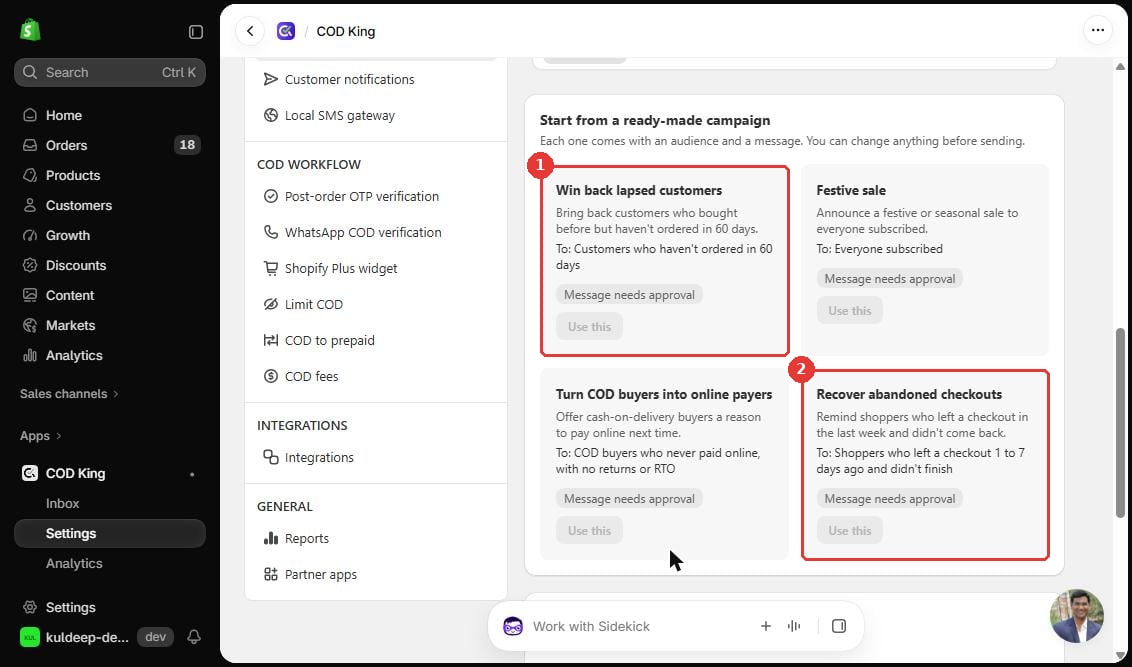
- Recover abandoned checkouts card: “Remind shoppers who left a checkout in the last week and didn’t come back.”
- Audience: Shoppers who left a checkout 1 to 7 days ago and didn’t finish.
- The message shows Message needs approval until WhatsApp approves it. The Use this button stays disabled until then.
The ready-made card shows the audience and message together. You can change anything before sending, as the page says.
Prerequisites
- A connected WhatsApp Business number (see Introduction and How It Works).
- An approved message for abandoned checkouts.
- Abandoned checkouts available for your audience. Use Import from store or Upload a list in the campaign setup checklist.
Step-by-step setup
Step 1: Connect your number and approve a message
Open Settings → WhatsApp campaigns. The setup checklist has three steps: connect your number, get a message approved, and bring in your customers.Step 2: Bring in abandoned checkouts
In step 3 of the checklist, click Import from store to copy your Shopify customers and abandoned checkouts into COD King. Use Upload a list to add your own list.Step 3: Use the Recover abandoned checkouts campaign
Open the ready-made Recover abandoned checkouts card and click Use this once the message is approved. Review the audience and message, then send.Configuration options
Dashboard view
The COD King home page includes an Abandoned Cart Intelligence card with a View carts button. Use it to see shoppers who left a checkout before you send a reminder.Practical example
A shopper adds a product to the cart, enters a phone number, and leaves the checkout on Monday. On Wednesday, the Recover abandoned checkouts campaign sends them a WhatsApp reminder from your brand number. If they complete the order, the reminder has done its job.Verification
- Check that the campaign shows the expected audience before you send.
- After you send, review the campaign results and the messages sent. See Checking Activity Logs and Replies.
Troubleshooting
- Use this is disabled. The message is still waiting for approval. Check the approval status.
- No shoppers appear in the audience. Import abandoned checkouts from your store or upload a list in the setup checklist.
Important notes and limitations
- Abandoned cart messages are charged at the WhatsApp marketing rate. On the dev store, this is $0.0116 per message. See the rates in Introduction and How It Works.
- The 1 to 7 day window is set by the ready-made campaign. Custom windows were not verified.