
How to update template for Whatsapp
Why WhatsApp Notification is needed
Customers are more likely to use whatsapp every now and then and it is the fastest and best way to get the notifications. It plays a major role in strengthening communication and ensuring smooth order management. Through Whatsapp customers get real-time updates (order placed, shipped, out for delivery, delivered) build trust. Customers feel informed and secure when they receive these notifications.

We can use the below options to send Whatsapp notifications to customers
- Confirmation Messages
- Order Fulfilment/Tracking
- Abandoned Cart Messages
- COD verification Messages
- First Time Purchase
Criteria for Whatsapp Notification
- There must be minimum of at least 5-10 products in the website.
- The website should have the Address, Phone number and email-ID.
- Shop is password protected.
- No domain linked.
- No real contact information and no social profile linked (If one of them are there then proceed).
- Very less products (1 or 2 products and not a brand)
- Store not looking professional and too new.
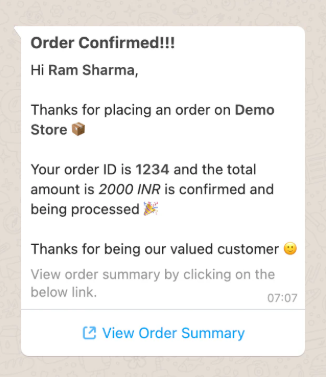
Find the below template of how the whatsapp message will be sent to customers:
Mandatory Steps To Update Whatsapp Template
To update your WhatsApp templates, you will first need to upgrade to the Enterprise Plan in the COD King app. Once upgraded, there are two possible scenarios:
- If you DO NOT have your own WhatsApp API
- If you DO have your own WhatsApp API
What is Whatsapp Business API ?
It’s the enterprise-grade version of WhatsApp that powers large-scale, automated customer engagement. Meta approval is needed to access the API
If you DO NOT have your own WhatsApp API
If you do not have a WhatsApp API, you can simply share the WhatsApp template content you want to update with the COD King team. We will update the template from our backend.
Important:
You may change the message content, but the number of variables and the order of variables must not change. For example, in an Order Confirmation template:
Customer Name
Store Name
Order ID
Order Amount
These variable positions must remain the same in any updated template.

If you DO have your own WhatsApp API
If you already have a WhatsApp API and want to send notifications using your own API:
You must upgrade to the Enterprise Plan. You can then integrate your WhatsApp API with the COD King app. Once integrated, you will receive login credentials for MSG91, which is our messaging partner. After logging into your MSG91 dashboard, go to the WhatsApp > Templates section.
You can add or update your templates directly from there.
Note:
The same rule applies here — the number and order of variables cannot be changed while updating any WhatsApp template.
For any inquiries or support, please email us at support@notifiktech.com. We’ll make sure to get back to you as soon as possible.
