
How Pricing works in COD King
Getting Started with COD King: Choosing Your Plan
Once you installed the COD King app, you’ll be directed to our Subscription Page. Here, you can choose the plan that best suits your business needs. Whether you’re just starting out or operating at scale, there’s a plan designed for you.
Every merchant will see three types of potential charges:
- Subscription Fee (only if you’re on a paid plan)
- Message Fee for SMS or Whatsapp notifications sent to customers
- Transaction Fee, applicable only when the Partial Payment feature is enabled
The goal is simple: you pay only for what you use.
Charges For Partial Payment
| Plan | Partial Paid Order Charge (on Total Cart Value) |
| Free Plan | 1% |
| Pro Plan | 0.8% |
| Enterprise | 0.5% |
Usage Charges for SMS/WhatsApp and Paid Plan Charges are added to your Shopify invoice automatically. No need to pay upfront for the messages.
Note: Additionally, there are 2% transactional fees on “COD to Prepaid” features.
Usage Charge for SMS and WhatsApp
| Plan | SMS Cost | WhatsApp Cost |
| Free Plan | ₹1.00 | ₹1.60 |
| Pro Plan | ₹0.85 | ₹1.30 |
| Enterpriser | ₹0.25 | ₹0.90 |
Below are the features where the charges will be applied;
- OTP Verification
- Order Confirmation
- Order Fulfilment
- Abandoned Checkout
- First-Time Purchase
- COD to Prepaid Conversion
Checking Message Pricing for Your Country
To help you understand communication costs across regions, COD King provides a dedicated Message Pricing section.
Simply open the pricing option, select your country, and instantly view SMS and WhatsApp charges under the Free, Pro, and Enterprise plans.
This transparency ensures you always choose the most cost-effective option for your business.
Please find the charges here for your country -> https://cod-king-6a9766d9c49f.herokuapp.com/pricing
Understanding Shopify’s $300 Billing Cap
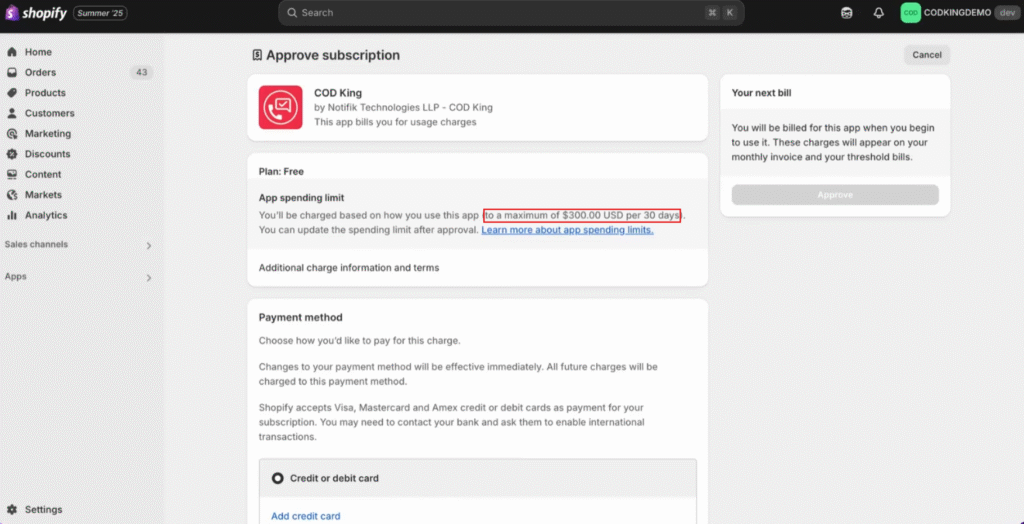
When you confirm your chosen plan on Shopify, you will notice a $300 capped amount. This cap is set by Shopify —not COD King.
What this means for you:
- It does not mean you will be charged $300
- You will only pay for:
- Your subscription plan
- Actual messages sent
- Partial payment transaction fees (if enabled)
The cap exists to protect merchants from unexpected billing spikes. It’s a safeguard, not a charge.
Tracking Your Usage & Message Costs
Once you begin using the app, monitoring your charges is Analytics section easy.
Go to the and open Usage Charges. Here, you can:
- Choose any message type
- View associated charges instantly
- Track usage in real time
This gives you complete visibility into your spending.
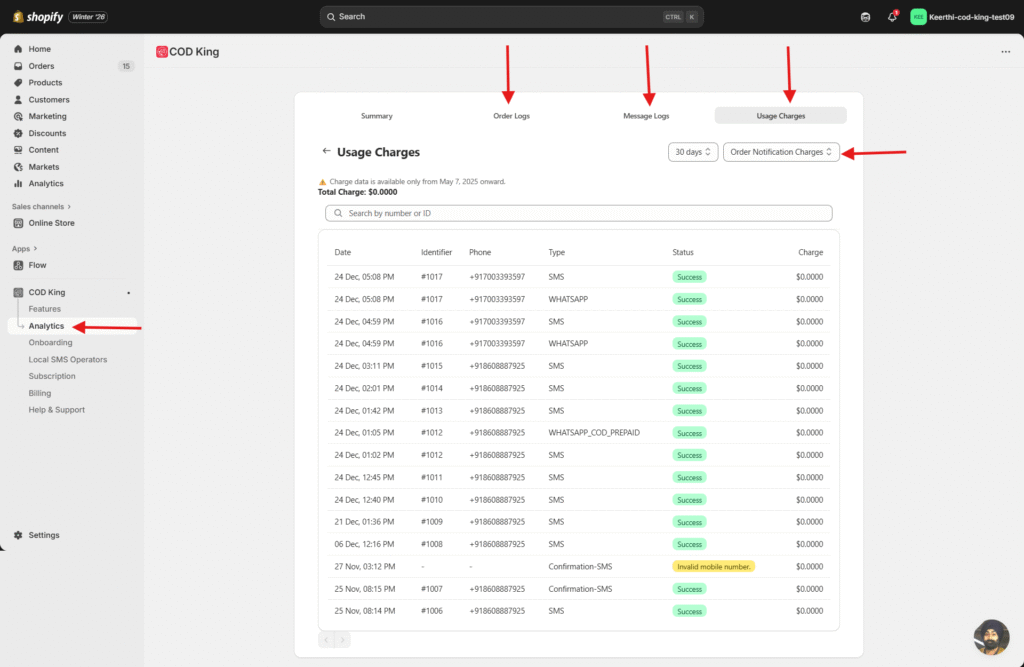
In the demo store, charges appear as zero, but in your live store values as they accumulate, you’ll see accurate.
- Go to Billing section in COD King, you will be able to see your current subscription plan, SMS charges, Whatsapp charges, transaction fee for partial payment charges and its breakdown.

Adjusting Your App Spending Limit
If you ever need to increase your monthly app usage limit on Shopify:
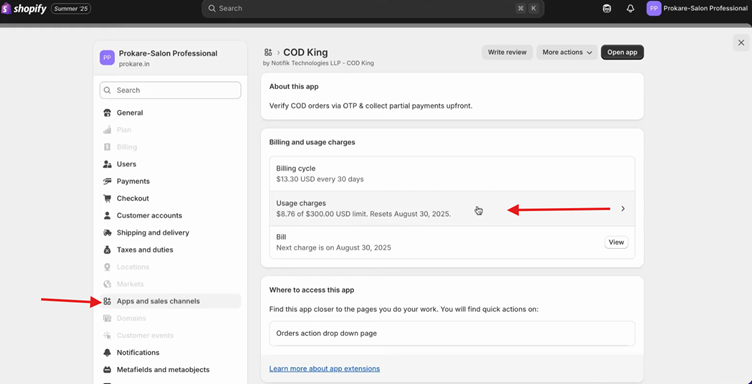
- Go to Settings → Apps and Sales Channels in Shopify setting
- Select the COD King app
- Open Usage Charges
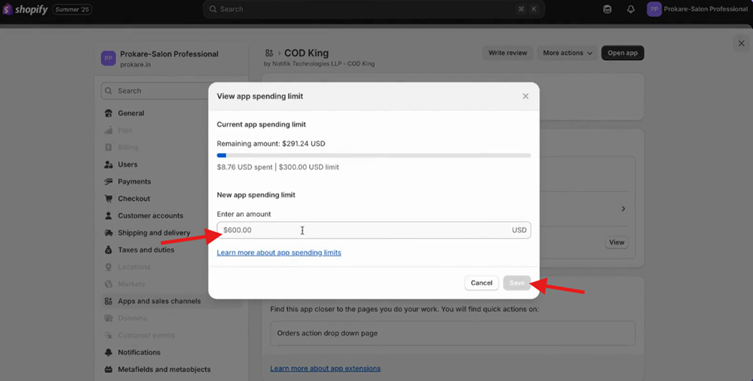
- Enter a new spending limit
- Ensure it is above $300, as Shopify requires this minimum of $300 and save the changes.
Custom Pricing for Growing Businesses
For merchants running large operations or managing multiple Shopify stores, COD King offers customized pricing plans tailored to your scale and requirements.
Simply reach out to our team to learn more about enterprise
Final thoughts
COD King is designed to provide a transparent-efficient pricing structure. Whether, flexible, and cost you’re tracking message fees, managing partial payments, or scaling operations across multiple stores, our platform gives you the clarity and control you need.
If you need help choosing a plan or understanding your usage, our team is always here to assist.
For any inquiries or support, please email us at support@notifiktech.com. We’ll make sure to get back to you as soon as possible
