
Step-By-Step Guide for setting up OTP Verification before placing an order?
Introduction →
In today’s digital age, security is of utmost importance, especially when it comes to online transactions. One effective way to enhance the security of your e-commerce app is by implementing OTP (One-Time Password) verification on the cart page. This additional layer of security ensures that only the rightful owner of the account can proceed with the cash-on-delivery (COD) payment method. In this blog post, we will discuss the steps to set up OTP verification on before placing order on the COD King app.
Setting Up OTP Verification →
Install and Launch the COD KING App In Your Shopify Store →
Install the ‘COD KING’ app from the Shopify App Store if you haven’t already. Once installed, navigate to your Shopify dashboard and select ‘Apps’. Click on the ‘COD KING‘ app to launch it from there.
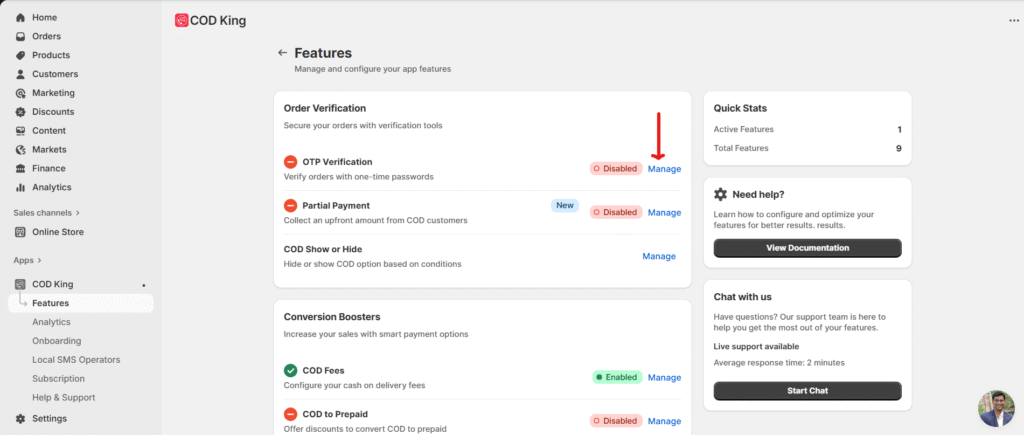
- Open the COD King app, navigate to the features and then click manage on “OTP Verification” tab.
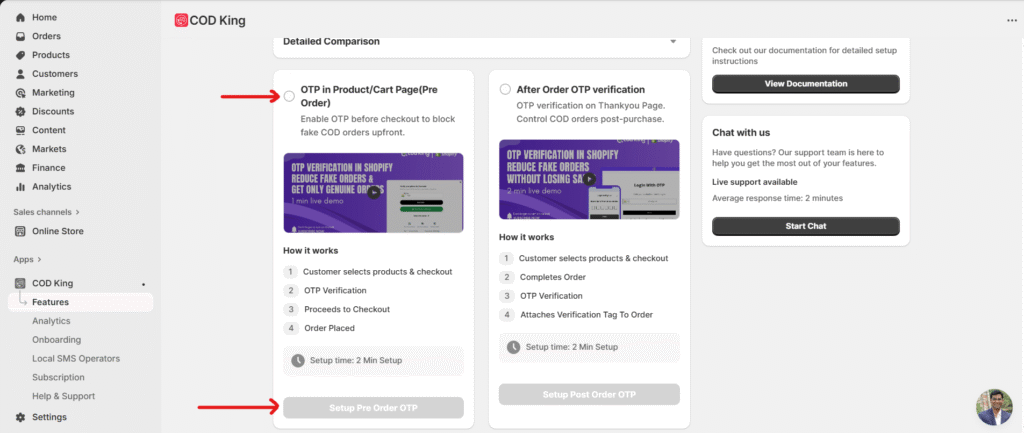
- Now click on “Setup Pre Order OTP” →
Now pre-order OTO setup will open. At enable theme integration, open theme editor and enable theme integration and save on Top right.
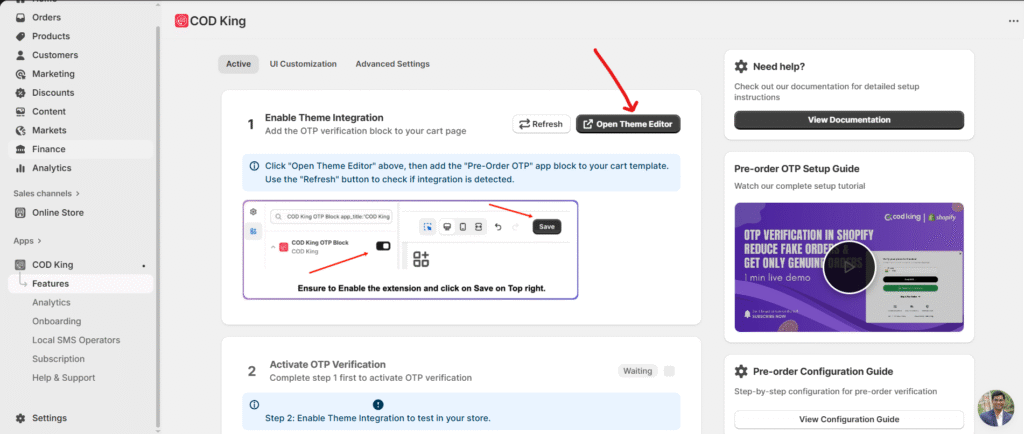
You will be redirected to a new window, where you need to enable the toggle for ‘COD King OTP Block’.
Once enabled, click ‘Save’ in the top-right corner to apply the changes.
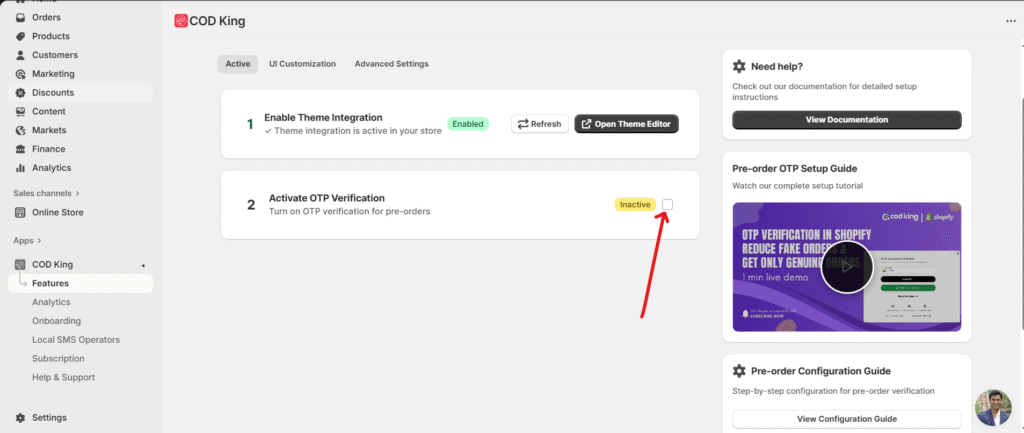
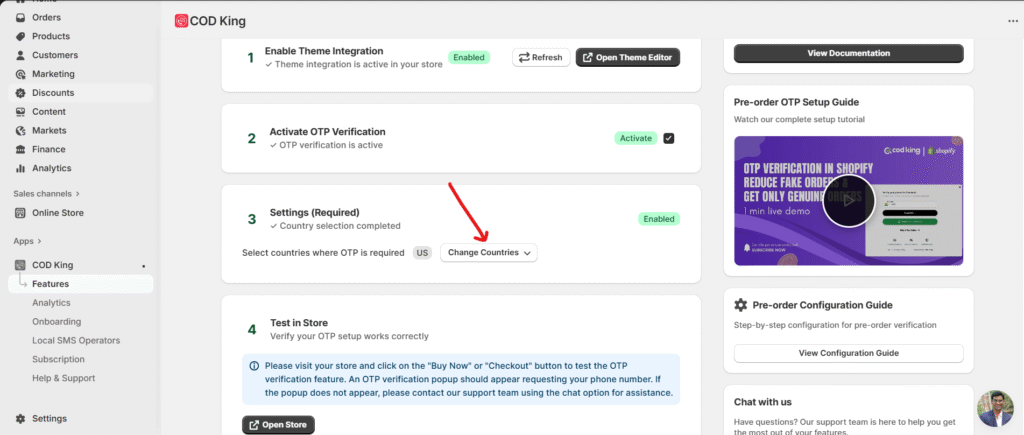
Now, it’s showing theme integration is enabled. Now activate OTP verification by clicking the checkbox as shown in below image.
Next, click on ‘Settings (Required)’ and select at least one country from the dropdown menu. You may select multiple countries if needed. The selected countries will appear in the country code dropdown for your customers during the OTP process.
Once this option is enabled, after the customer verifies the OTP, all addresses linked to that phone number in Shopify will be displayed. The customer can then select one of the available addresses or add a new one if needed.
This is how it will look in your store.
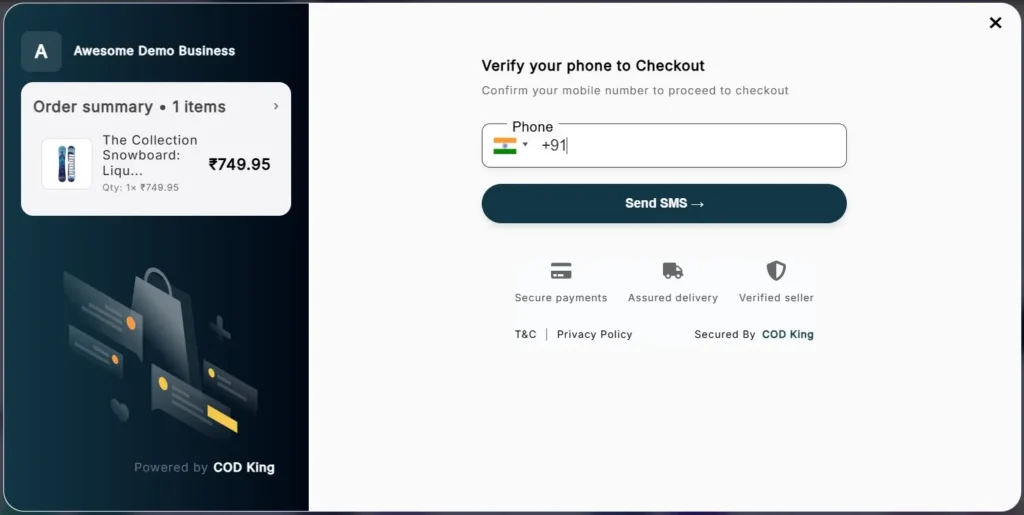
- In the next steps, you can customize the UI of the OTP modal according to your preferences.
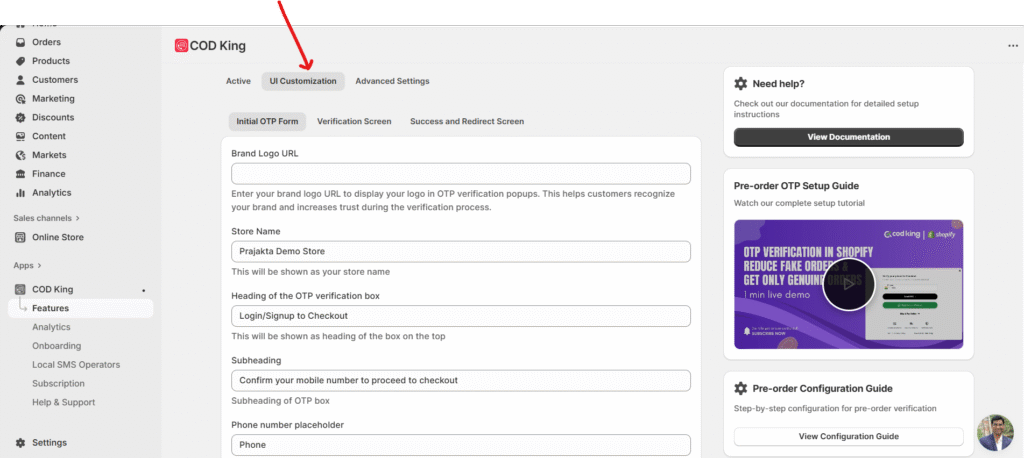
- You can add the brand logo URL and can change the store name, heading, subheading, button label, etc.
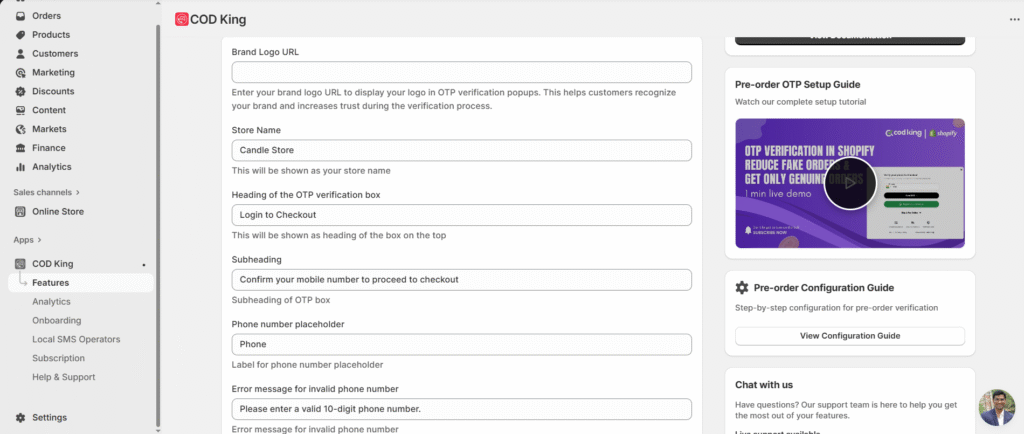
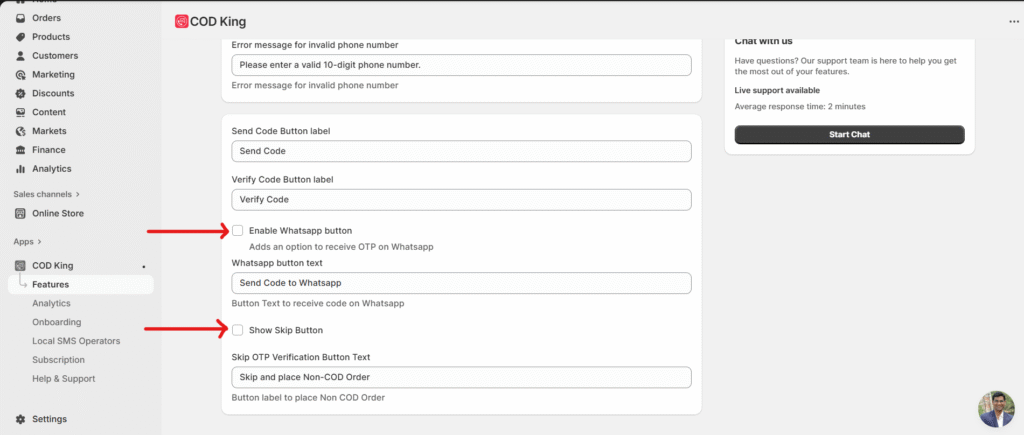
You can also show or hide the Skip and WhatsApp buttons by enabling or disabling the checkboxes below.
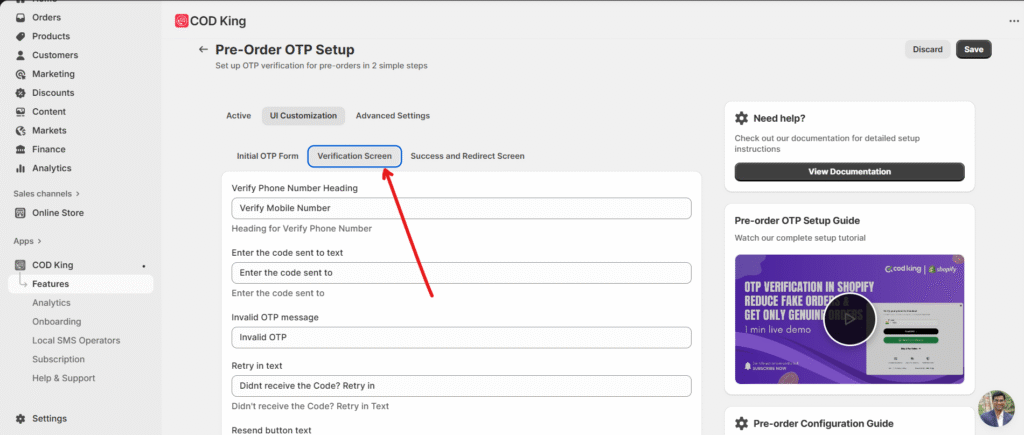
You can also customize the text displayed on the verification screen.
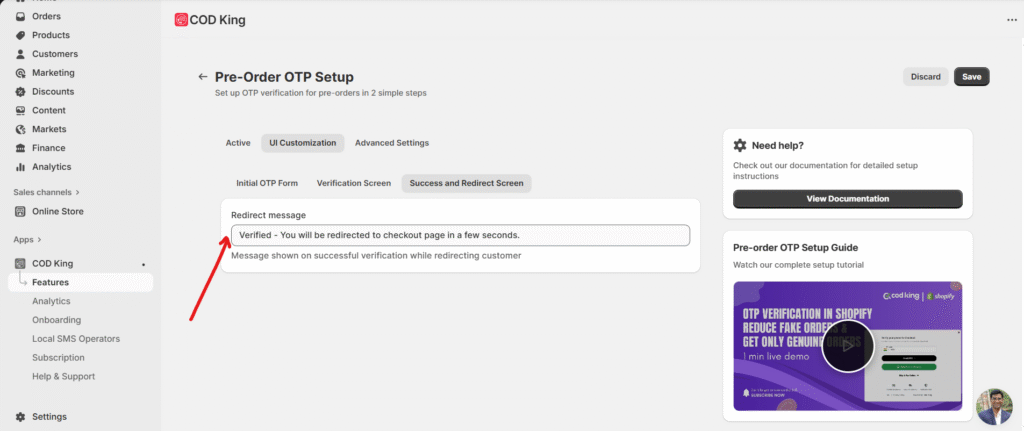
You can also customize the text on the verification screen, as well as the success and redirect screens.
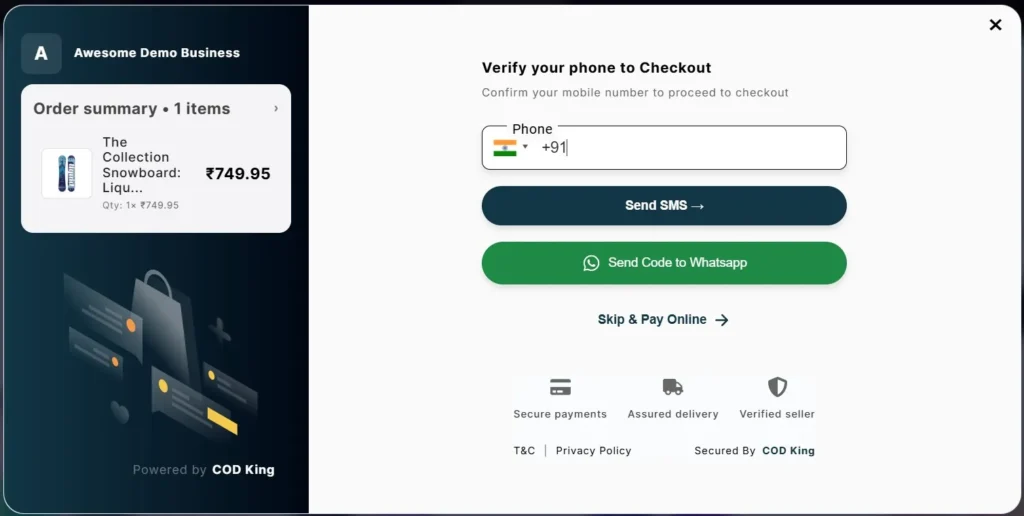
Once you enable the ‘Show Skip’ and ‘WhatsApp’ buttons, the OTP verification popup will appear like this on your store.
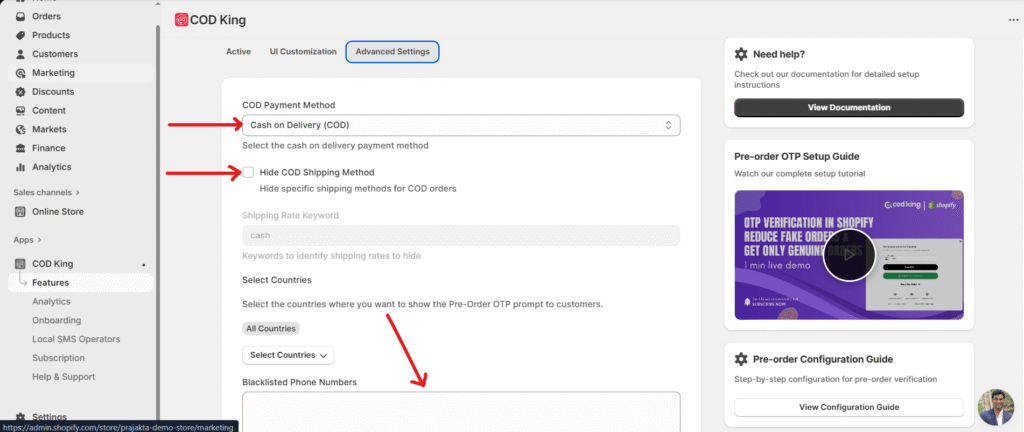
Lastly, in the Advanced Settings, make sure to select the Cash on Delivery payment method.
If you want to hide the shipping method when a customer skips OTP verification, please enable the checkbox labeled “Select Cash on Delivery Shipping Method.”
Note: If you enable this checkbox, ensure that the ‘Skip’ button (mentioned in point 8) is also activated.
Additionally, you can block specific phone numbers from OTP verification by entering them in the field shown below. Once blocked, OTP verification will not be triggered for those numbers.
Benefits of OTP Verification →
Implementing OTP verification at the cart page offers several benefits for both the customers and the e-commerce platform:
- Enhanced Security: OTP verification adds an extra layer of security to the COD payment method, reducing the risk of unauthorised transactions and fraudulent orders.
- Customer Trust: By incorporating OTP verification, customers gain confidence in the security measures taken by the COD King app. This trust can lead to increased customer loyalty and satisfaction.
- Reduced Order Cancellations: With OTP verification in place, the likelihood of fraudulent orders decreases significantly. As a result, the number of order cancellations due to unauthorised transactions also decreases, saving time and resources for both the customer and the e-commerce platform.
Conclusion →
In conclusion, setting up OTP verification at the cart page on the COD King app is a crucial step towards ensuring the security and trustworthiness of your e-commerce platform. By following the simple steps outlined in this blog post, you can enhance the security of cash on delivery transactions and provide a safer shopping experience for your customers 🙂
And don’t forget to save the changes 🙂
That’s it. Thanks for letting us help you.
If you have any questions, reach out to us at support@notifiktech.com, and we will be happy to assist you 😊 or use the chat option in the app by ****directly using the chat bubble on the bottom right of the app or book a session with us for free.