
How to Integrate Whatsapp with COD King
In COD King, we use MSG91 as our official WhatsApp service provider. MSG91 acts as a bridge between COD King and Meta’s official WhatsApp Business API, allowing us to send automated, secure, and verified WhatsApp messages to customers who place Cash on Delivery (COD) orders.
This integration is mainly used for:
- OTP verification
- Order confirmation
- Address confirmation
- Delivery updates
- Abandoned cart reminders
- Fraud prevention and order validation
Unlike normal WhatsApp, this communication is done via WhatsApp Business API, which means all messages are sent in a structured, compliant, and verified way.
Default WhatsApp Number in COD King:
By default, all WhatsApp messages (OTP + order confirmation + COD verification) are sent through COD King’s official, verified WhatsApp number under the name “COD KING”.
Using Your Own WhatsApp Business Number
Merchants who want to send messages from their own business WhatsApp number must:
Upgrade to the Enterprise Plan
Have a Meta-approved WhatsApp Business API number
Integrate Your WhatsApp – Newly Introduced Section in COD King App
COD King has introduced a new feature under Features → Customer Notifications called “Integrate Your WhatsApp Number.”
This section allows merchants to easily connect their WhatsApp number with the app so they can send important customer notifications directly on WhatsApp.
Where to Find It
- Open the COD King app.
- Go to Features.
- Scroll to Customer Notifications.
- You will now see a new option: Integrate Your WhatsApp Number.
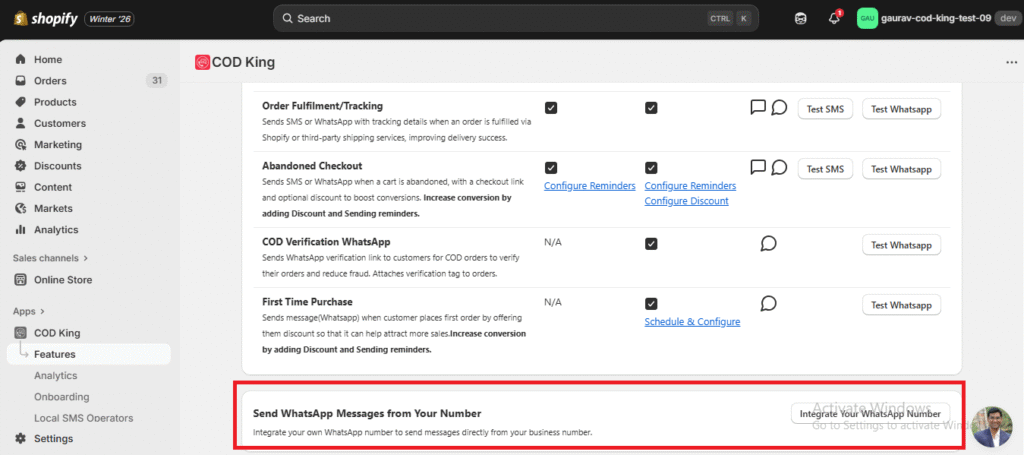
Basic Requirements for WhatsApp Business API
To get your WhatsApp API number approved, you must have:
A legally registered business with GST
A dedicated phone number (not active on WhatsApp)
A verified Meta Business Manager account
A live website with privacy policy
Valid KYC/business documents
A payment method added to Meta Business Manager
Approval Process for WhatsApp Business API:
Follow these steps:
1.Create & Verify Meta Business Manager
Add your business details
Complete business verification with legal documents
- Add and Verify Dedicated Phone Number
The number must not be linked with personal WhatsApp
Verify using SMS or voice OTP
- Create Message Templates
Templates must be approved by Meta before sending automated messages. Common templates include:
OTP for COD verification
Order confirmation
Address confirmation
Delivery attempt update
Abandoned checkout reminder
- Apply for WhatsApp Business API
Apply here:
https://www.facebook.com/business/m/whatsapp/business-api
Once approved, Meta provides API credentials which connect to COD King through MSG91.
Connecting WhatsApp API to COD King (via MSG91)
After Meta approval, the merchant’s number is registered inside the MSG91 dashboard, which provides:
Auth Key / API Key
WhatsApp sender number
Template namespace
These details are then configured inside COD King to complete the integration.
How COD King Triggers WhatsApp Messages:
When a customer places a COD order:
- COD King captures customer details (order ID, phone, address, etc.)
- COD King sends an API request to MSG91
- Request contains:
Customer mobile number
Approved template name
Template variables (OTP, name, order ID, etc.)
- MSG91 forwards it to the WhatsApp Business API
- The customer receives the message instantly
For customer replies:
COD King can respond using session messages within the 24-hour WhatsApp window
After 24 hours, only approved templates can be used
Important Note on Meta Verified:
Meta Verified improves brand credibility
But it does NOT replace WhatsApp API approval
You must still complete Meta Business verification & template approvals
Technical References (For Advanced Users)
MSG91 WhatsApp Guide
https://msg91.com/help/whatsapp/guide-to-whatsapp-messaging-with-msg91
MSG91 WhatsApp API Documentation
https://docs.msg91.com/whatsapp
Need Assistance?
If you need help setting up WhatsApp on COD King, contact us at:
📩 support@notifiktech.com
