
Step-By-Step Guide to convert your COD orders to Prepaid ?
Cash on Delivery (COD) orders usually carry a high return rate and extra operational costs. To reduce this and increase prepaid orders, COD King offers a smart COD to Prepaid Conversion feature. This guide explains how to set it up in a few simple steps.
What is COD to Prepaid Conversion?
COD King sends WhatsApp or SMS messages with a secure payment link to customers who placed COD orders.
Customers can complete the payment instantly, turning the COD order into a prepaid one.
- Average conversion rate in India: 3–4%
- A 2% conversion fee applies only on successful COD → Prepaid conversions
- You can also show a banner on the Thank You page encouraging users to pay online
Step-By-Step Setup Guide
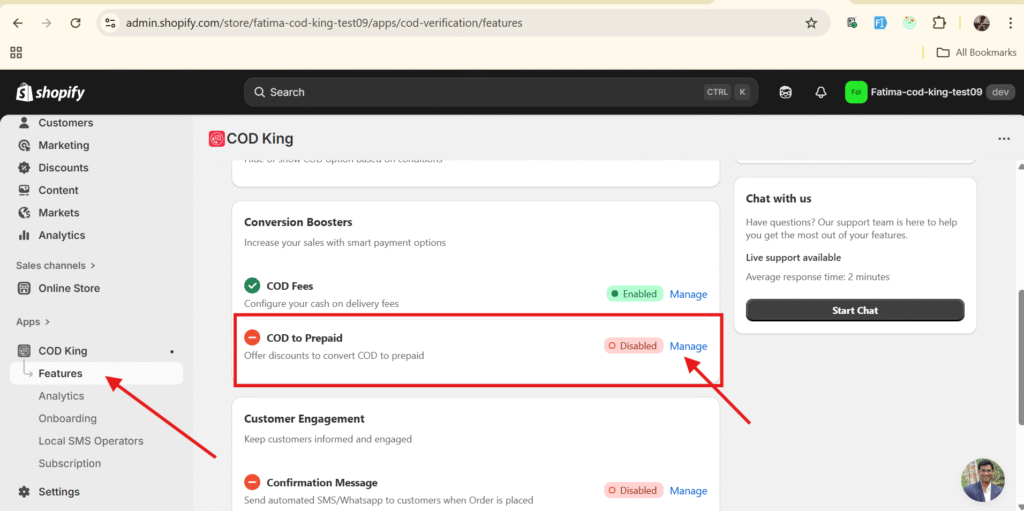

Step 1: Activate COD to Prepaid Conversion
- Go to the COD King Dashboard.
- Open COD To Prepaid.
- Click Activate COD to Prepaid Conversion.
- Enable:
- Send WhatsApp/SMS conversion messages
- Show banner after order placement
This ensures customers receive the payment link immediately after placing a COD order.
Step 2: Configure Checkout Integration (Mandatory)
This step is required for showing the conversion banner on the Thank You and Order Status pages.
1. Enable COD King Extension on the Thank You Page
- Open Thank You Page settings in your Shopify theme.
- Scroll to App Blocks.
- Select otp-cod-king-thankyou.
- Click Save.
2. Enable COD King Extension on the Order Status Page
- Open Order Status Page settings.
- Go to App Blocks.
- Select otp-cod-king-thankyou.
- Click Save.
Once this is done, the conversion banner will appear automatically for customers after they complete the checkout.
Step 3: Select Your Payment Gateway
COD King supports multiple gateways; the common one is Razorpay.
To integrate Razorpay:
- Choose Razorpay as your payment provider.
- Enter your:
- Razorpay API Key
- Razorpay API Secret
This allows the system to generate secure online payment links for COD customers.
Step 4: Set Discount for Prepaid Conversion (Optional but Recommended)
Offering a small discount increases the chance of converting COD orders to prepaid.
- Choose Flat Amount discount.
- Enter the discount value (example: ₹20 or ₹30).
- This discount will be applied when sending the payment link.
This step helps motivate customers to shift to online payment.
Step 5: Schedule Automated WhatsApp/SMS Reminders
As per the Meta policy, customers cannot receive more than one marketing message within 24 hours.
COD King allows you to send two reminders:
First Reminder
- Choose: Send or Don’t Send
- This message goes right after the order is placed.
Second Reminder
- Again choose: Send or Don’t Send
- The message will be sent 24 hours after the first one.
These reminders include the payment link, encouraging customers to complete their payment instantly.
Final Result
Once everything is set up:
- Customers placing COD orders will automatically receive the payment link.
- A banner will appear on the Thank You Page and Order Status Page.
- Customers can convert their order to prepaid with one click.
- You save on RTO (Return to Origin) and improve order reliability.
