
Understanding the Auto cancellation and retry messages in Post Order
Managing Cash-on-Delivery (COD) orders can be challenging—especially when customers don’t confirm their orders on time or miss important updates. COD King solves this problem through automated post-order workflows, including Auto-Cancellation and Retry Messages. These features help store owners reduce fake orders, improve order confirmation rates, and maintain healthy fulfilment operations.
In this article, we’ll clearly explain what Auto-Cancellation is, how Retry Messages work, and why they matter for your Shopify store.
What Are Post-Order Messages in COD King?
Once a customer places a COD order, COD King automatically sends follow-up messages through SMS/WhatsApp to confirm, verify, or remind customers about their pending orders.
The two most important message types under this category are:
- Auto-Cancellation Messages
- Retry Messages
Let’s understand each in depth.
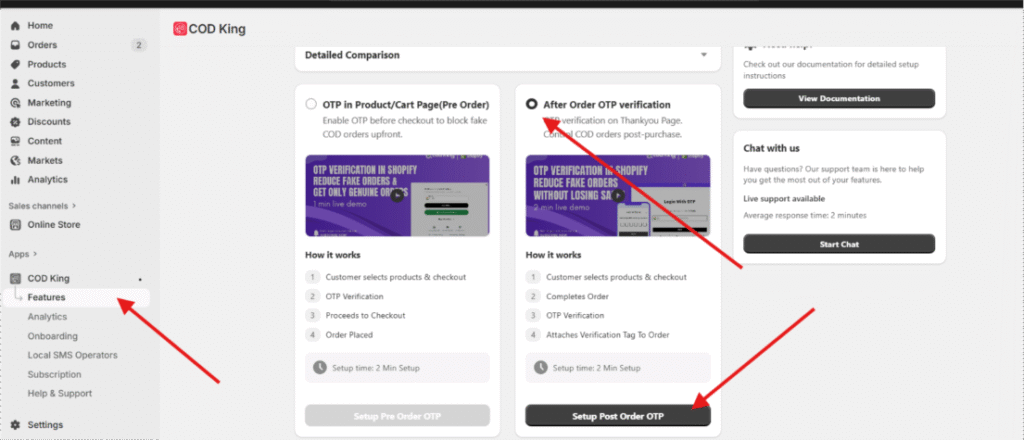
To get These Features First You have to enable Post Order OTP Verification
1. Auto-Cancellation Messages
What Is Auto-Cancellation?
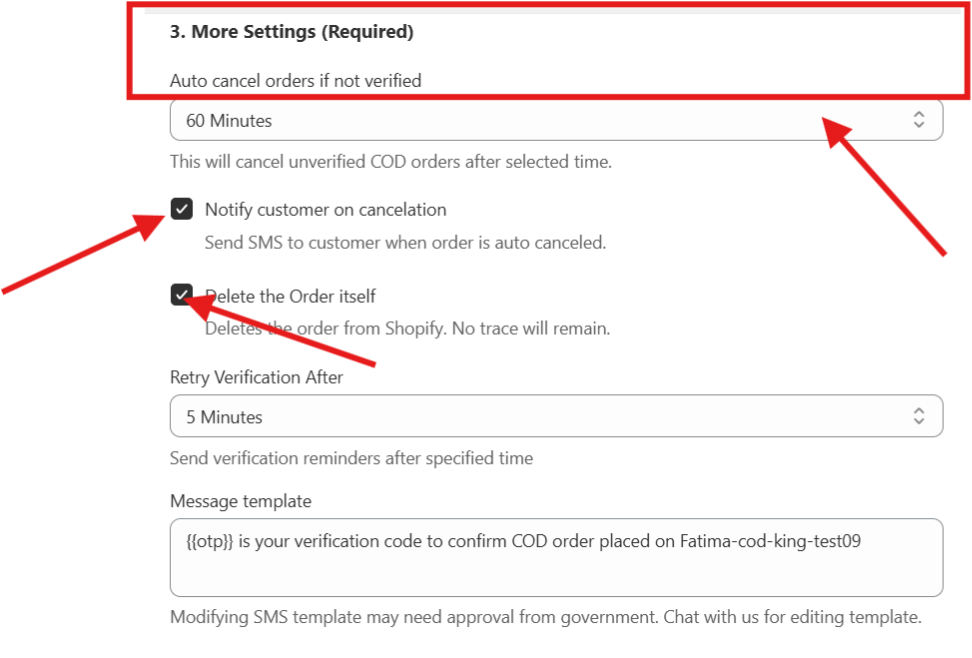
Auto-cancellation is a smart feature in COD King that automatically cancels unverified or unconfirmed COD orders after a set period of time.
If a customer doesn’t respond to the confirmation message or verification prompt, COD King sends an Auto-Cancellation alert and cancels the order to protect your store from:
- Fake COD orders
- Incorrect phone numbers
- High Return-to-Origin (RTO) rate
- Wasted shipping charges
How It Works
- Customer places a COD order.
- COD King sends a confirmation/OTP/verification message.
- If the customer ignores or doesn’t verify, COD King automatically sends an auto-cancellation message.
- The order gets canceled automatically after your configured time (e.g., 30 min, 1 hour, 24 hours).
Benefits
- Saves time otherwise spent manually tracking unverified orders
- Reduces operational cost and RTO losses
- Keeps your order list clean and accurate
- Improves verification success rate by removing unresponsive orders
2. Retry Messages
What Are Retry Messages?
Retry Messages are reminders sent to customers when their initial confirmation fails.
For example:
- OTP delivered but customer didn’t enter it
- Customer saw the message but forgot to verify
- Phone was switched off or busy
COD King sends a retry follow-up message encouraging the customer to confirm the order again.
How It Works
- Initial confirmation/verification message is sent.
- If the customer doesn’t respond within the selected time, COD King automatically triggers a Retry Message.
- Customers can reconfirm with a single tap, link, or OTP (depending on your settings).
Why Retry Messages Are Important
- Encourages customers who simply missed the first message
- Boosts verification percentage
- Saves you from canceling orders that were actually valid
- Increases successful COD deliveries
- Improves customer experience by giving another chance to verify
Auto-Cancellation vs Retry Messages (Quick Comparison)
| Feature | Auto-Cancellation | Retry Messages |
|---|---|---|
| Purpose | Cancel unverified orders | Remind customers to verify |
| Timing | After final waiting period | Before cancellation |
| Goal | Reduce fake orders and RTO | Improve order confirmation rate |
| Customer Action Needed | None (order gets cancelled) | Yes (click link/OTP to verify) |
Why These Features Matter for Your Business
COD orders are risky, but most customers still prefer COD in India and other markets. COD King’s Post-Order system ensures:
✔ Fewer fake orders
✔ Higher confirmation success rates
✔ Lower shipping losses
✔ Automated workflows that save time
✔ Better customer communication
✔ Improved overall store performance
With Auto-Cancellation and Retry Messages working together, you get complete control over your COD pipeline.
